Transactions mapping, template rules and campaign linking
Transaction Mapping to Staging Record Process
The transaction mapping process allows you to PUSH your Engaging Networks supporter actions into Salesforce as Engaging Networks Staging records in the Engaging Networks connector app. Once the data becomes a staging record, the Connector App processes it into Salesforce objects using mapping rules.
Mapping Rules Templates
As part of the Engaging Networks Connector App, a collection of templates for transaction mapping is available for clients using the NonProfit Success Pack. The templates are provided to help you easily begin setting up your mapping rules when using the Engaging Networks Connector App. You can view these templates in the transaction mapping interface.
However, as these are templates, they should be treated as a starting point for transactional mapping and will need to be validated and tested to ensure compatibility with your Salesforce org. It is therefore the responsibility of the Salesforce administrator to ensure that they meet your business requirements and to create your own mapping rules if the templates are not suitable.
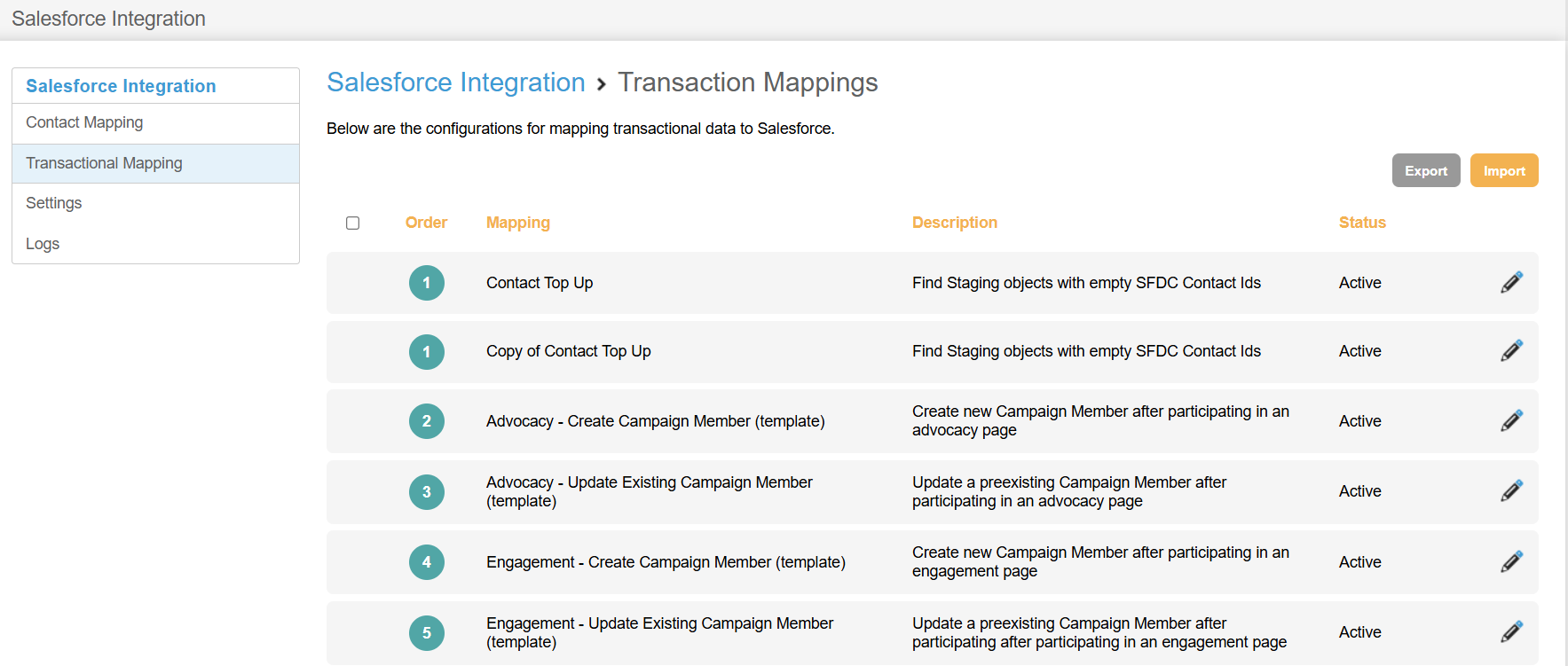
In Engaging Networks, the transaction mapping area serves as an interface to the mapping rules in the linked Salesforce org.
Here you’ll find a simplified view of the mapping templates with limited editing options, and a few key functions:
Install Mappings during the setup phase and when new modules are released
Export and Import Mappings for backing and or moving tested mappings from the Salesforce sandbox to production.
Engaging Networks provides template mappings which allow for basic customisation within Engaging Networks; however, a Salesforce administrator can make advanced customisations in Salesforce.
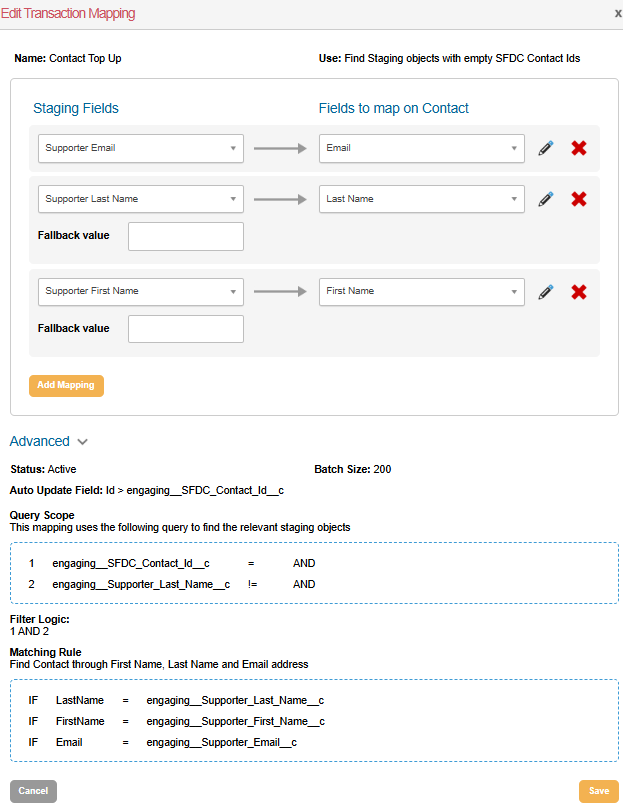
Edit and view the templated mapping rule to see the staging records fields, any applicable override or fallback values, and the corresponding mapping in Salesforce.
Adding mappings allows you to add new mappings to your rules.
Advanced lets you view a read-only version of the mapping rules configuration, allowing you to review all options but not edit them. Advanced editing should be completed by the Salesforce administrator in the Salesforce Connector app.
Understanding Mappings in the interface
Understanding Mapping Templates
The following explains the templates we provide:
Advocacy – Create Campaign Member (template)
Upon installing this mapping, a confirmation screen will appear.
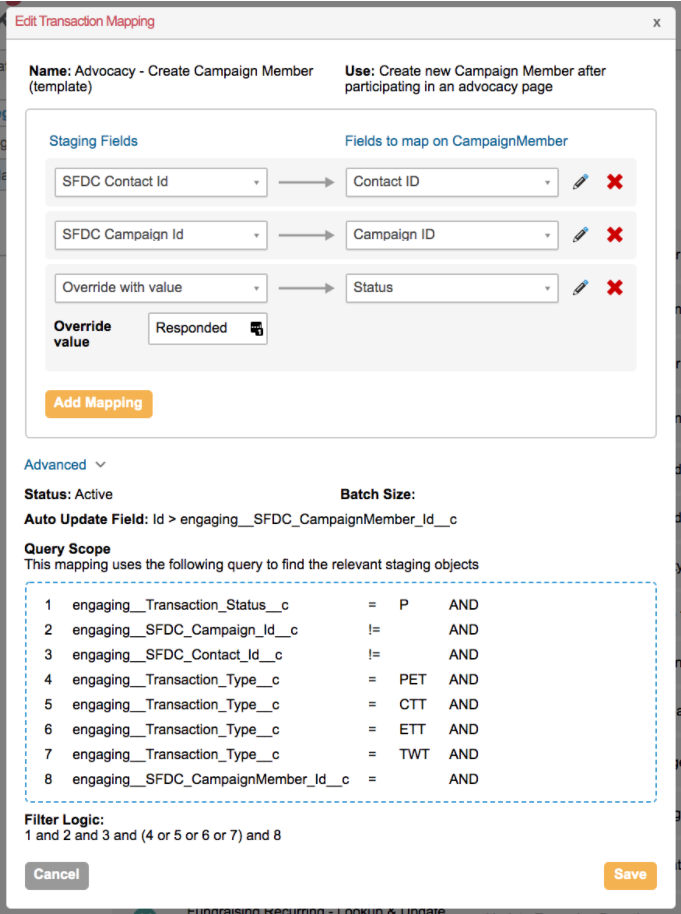
This Mapping Rule finds staging records whose Transaction Type is PET, ETT, CTT, or TWT and that don’t have an SFDC CampaignMemberId value.
The expectation is that a page or email has been linked by Campaign Linking and that the Contact has not been added to the Campaign.
This rule creates the CampaignMember from the SFDC Contact Id and SFDC Campaign Id values, off the staging record.
Advocacy – Update Existing Campaign Member (template)
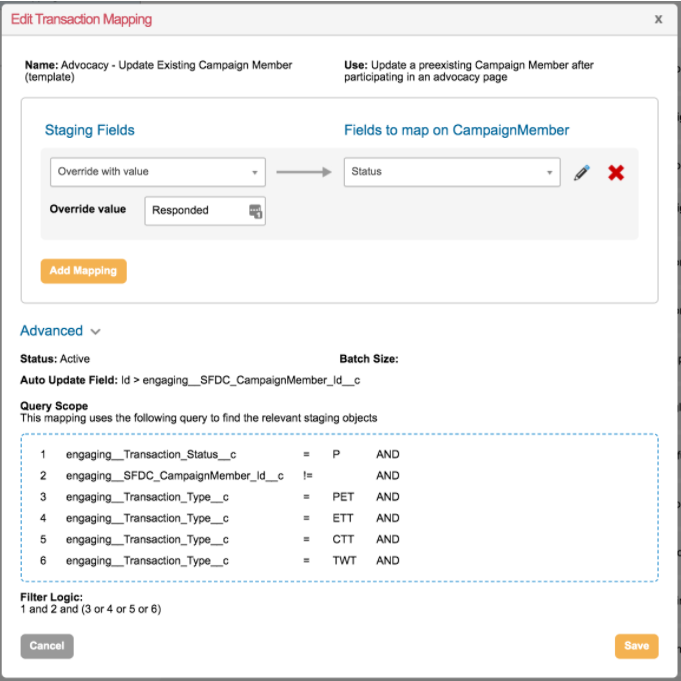
This second Mapping Rule is designed to find staging records whose Transaction Type is PET, ETT, CTT, or TWT and that have an SFDC CampaignMemberId value.
The SFDC CampaignMember ID is present on the staging record because a trigger installed with the package is in effect.
If the SFDC Campaign ID and SFDC Contact ID are populated, a trigger will run when the staging record is created to check for an associated CampaignMember. If found, it will populate the SFDC CampaignMember ID.
This then allows for this mapping rule to set the CampaignMember’s Status to Responded.
Mapping Rules Template Collection
These are the mapping rule templates currently available in the Engaging Networks Connector App:
Contact Top Up Mapping
Contact Top Up Mapping
Transaction Type
Description
All
Find Staging objects with empty SFDC Contact IDs.
Because the Contact Sync runs every twenty minutes, it is expected that all transactions written to the ENSR table will have a corresponding SFDC Contact ID. Most fundraising mappings rely on this Contact ID, for example, to attach a new Opportunity to the donor. If an ENSR arrives with no SFDC Contact ID, this mapping creates a simple contact (First Name, Last Name, and Email only) so the mappings can proceed. This new Contact should be picked up by the contact sync and filled in with the remaining supporter details (address, etc.) shortly after creation. (This previously ran on Fundraising transactions only, but has been generalized to all transactions with a 'Group by', ensuring the mapping avoids creating duplicate Contacts)
Advocacy Mappings
Advocacy Mappings
Advocacy – Create Campaign Member (template)
PET, CTT, ETT, TWT
If an advocacy page is configured with an SFDC Campaign ID, this mapping rule adds participants to the Campaign. The Campaign Member status is set to Responded.
This mapping runs only if the Contact is not a pre-existing Campaign member. Salesforce does not allow adding a Contact to a Campaign more than once. A trigger installed on the ENSR object checks whether a Campaign Member already exists for this Contact/Campaign combination when both the Campaign ID and Contact ID are populated during ENSR creation. If a match is found, the trigger writes the Campaign Member ID to the ENSR. This way, the “create” mapping avoids creating a duplicate Campaign Member by checking the SFDC CampaignMemberID field.
If multiple unprocessed staging records exist for the same Contact ID - Campaign ID pair, this mapping rule performs a 'group by', ensuring the contact is added to the campaign only once. This can happen, for example, with ETT, where one action with 4 targets can result in 4 distinct staging record rows.
Advocacy – Update Existing Campaign Member (template)
PET, CTT, ETT, TWT
This mapping is a companion to “Advocacy – Create Campaign Member” above. If a Campaign Member already exists, this mapping updates the Campaign Member's status to “responded”.
If multiple unprocessed staging records exist for the same Contact ID - Campaign ID pair, this mapping rule performs a 'group by', ensuring the contact is added to the campaign only once. This can happen, for example, with ETT, where one action with 4 targets can result in 4 distinct staging record rows.
Engagement Mappings
Engagement Mappings
Engagement – Create Campaign Member (template)
SVY, EMS, UNS, ECF
If an engagement page is configured with SFDC Campaign ID, this mapping rule adds participants to the Campaign. The Campaign Member status is set to Responded
Engagement – Update Existing Campaign Member (template)
SVY, EMS, UNS, ECF
This mapping is a companion to “Engagement – Create Campaign Member” above. If a Campaign Member already exists, this mapping updates the Campaign Member's status to “responded”.
Email Open – Create Campaign Member (template)
EBC, MBC
If an outgoing email (broadcast or marketing automation) is configured with SFDC Campaign ID, this mapping rule adds email openers to the Campaign. The Campaign Member status is set to Responded.
Email Open – Update Existing Campaign Member (template)
EBC, MBC
This mapping is a companion to “Email Open – Create Campaign Member” above. If a Campaign Member already exists, this mapping updates the Campaign Member's status to “responded”.
Fundraising and In-Memory Mappings
Fundraising and In-Memory Mappings
Fundraising Single – Opportunity (template)
FCS, FBS, FOC
The first of two mappings for processing one-time (single) donations, this mapping builds out an Opportunity for each successful fundraising transaction. By default, the mapping includes standard fields such as Amount and Close Date. It also writes the EN Tracking and Appeal Codes, enabling analysis through Salesforce reports. The gateway reference (EN Transaction ID field) preserves an audit trail between Salesforce Opportunities, Engaging Networks Transactions, and your payment gateway.
The mapping relies on the following NPSP components. If any of these are not used in your Salesforce org, you will need to adjust the mapping rule accordingly:
Opportunity Naming Rules are active
Stage picklist has a value named “Posted”
Fundraising Single – Payment (template)
FCS, FBS, FOC
The second of two mappings for processing one-time (single) donations, this mapping builds out a Payment object for each successful fundraising transaction. The mapping marks the payment as “paID”, records the Payment Method (Credit Card or ACH/EFT), and records the gateway reference as Check/Reference Number to preserve clear audit trails.
If your Salesforce org uses NPSP's GAU Allocation object, you might need to write a third mapping rule for this purpose. If you are using NPSP Default Allocations, you can simply place a GAU Allocation on the Campaign that is referenced by the field. No mapping changes are needed. If you are not using Default Allocations, you can use the "direct my gift" tagged field (Transaction Data 20) as either a hidden field or as a picklist to hold the fund designation. You will need to build an additional mapping rule to handle the allocation and ensure it is properly chained into the Opportunity - Payment - Allocation chain (don't mark it as complete until all 3 elements have run).
Fundraising Recurring - New RD for Imported Transactions
FCR, FBR, where Transaction Data 4 = .00
When recurring transactions are migrated/imported into Engaging Networks, an initial $0.00 transaction is created to indicate that the gift has been imported. This mapping rule uses the data stored in these initial rows to create the Recurring Gift, which can be updated the next time the transaction processes. It functions very similarly to the Fundraising Recurring – New RD mapping rule (see below), but uses different criteria to find imported transactions.
Fundraising Recurring – New RD (template)
FCR, FBR, where Transaction Data 11 is empty
The first of three mappings for processing a *new* Recurring Donation commitment. This mapping rule creates an NPSP Recurring Donation object with an open-ended status (no fixed end date) and a Monthly/Quarterly/Annual frequency. The gateway ID (Data 2) is stored in the Recurring Donation (EN Parent Transaction ID), as this “parent transaction ID” will be used to process all subsequent recurring charges.
NPSP automatically creates a series of “pledged” Opportunities matching the anticipated payment schedule. The first of these “pledged” opportunities will be marked as “posted” in a subsequent mapping rule.
The default mappings are configured to work with NPSP's Enhanced Recurring Donations model, with Future Pledged Opportunities configured to create at least 1 pledged Opportunity. If you have turned off Pledged Opportunities in NPSP settings, you will need to modify the "Fundraising Recurring - Opportunity" mapping to create a new Opportunity instead of looking up & updating an existing Opportunity.
The first of three mappings for processing a *subsequent* recurring transaction. This mapping rule uses the “parent transaction ID” of the incoming transactional data (Transaction Data 11) to look up the Recurring Donation that was created when the commitment was first initiated. The parent is written to the SFDC Recurring Donation ID field. This mapping also updates the parent Recurring Donation with the latest “amount” and “day of month” configured in Engaging Networks to ensure NPSP and EN payment schedules remain in sync, and to ensure the RD status is set to "Active".
Fundraising Recurring – Opportunity (template)
FCR, FBR
The second of three mappings for both *new* and *subsequent* recurring transactions. This mapping rule looks up a “pledged” Opportunity in the parent RD’s payment schedule, and updates the status from “pledged” to “posted”. It also updates the actual Close Date for the Opportunity (which may differ from the scheduled date, for example, if the card was declined at first but succeeded on a retry), the actual Amount processed, the tracking values/appeal codes, and the gateway ID for the transaction.
For a pledged Opportunity to be identified and posted, the scheduled Close Date for the Opportunity must be on or before the actual processing date of the transaction. This is specified in the Matching Rule filter.
Fundraising Recurring – Payment (template)
FCR, FBR
The third of three mappings for both *new* and *subsequent* recurring transactions. This mapping rule attaches a Payment to the Opportunity that was changed from “pledged” to “posted”. If the pledged Opportunity already had a Payment, the mapping updates that existing payment instead of creating a new one. The Payment is marked as “paid”, and both the Payment Method and Gateway ID are captured.
Run when a recurring transaction record has a status of "change" or "reject", this mapping helps keep NPSP's Recurring Donations in sync with what is happening on the Engaging Networks side. This mapping:
Updates an RD from "Active" to "Lapsed" if Engaging Networks has automatically suspended payments due to 3+ declines on the credit card.
Updates an RD from "Active" to "Closed" if the Engaging Networks donation has been cancelled
Updates an RD from "Active" to "Closed" if the Engaging Networks donation has been paused
Updates the Day of Month and Amount if either of these has changed in Engaging Networks (e.g. if the donor upgrades their monthly gift)
Fundraising Recurring - Card Update (template)
FRU
When a donor updates their payment card information in the Supporter Hub, or a user updates the donor's payment card information, the Parent Transaction ID for the recurring sequence changes. The FRU transaction allows us to look up the RD attached to the prior Parent Transaction ID (Transaction Data 11) and write the new Parent Transaction ID (Transaction Data 02) so future transactions can be properly matched to the correct parent RD.
Fundraising In Memoriam (template)
FIM
When a tribute gift is processed in Engaging Networks, two transaction rows are generated. The first row is the financial detail (FCS/FBS), which is processed using the same mapping as non-tribute gifts, “Fundraising Single – Opportunity.” The second row is the In Memorium transaction (FIM).
This mapping looks up the Opportunity created by the prior “Fundraising Single – Opportunity” rule and appends Tribute information to this Opportunity per the FIM transaction row. The sample mapping writes:
Tribute Type = Honor
Honoree Name
Notification Recipient Name
Notification Recipient Information (Email and/or Mailing Address) – this field is populated via a formula field on the ENSR (“Additional Note”), which draws all the relevant data into one common field
This mapping is a sample of processing tribute gifts. This rule will need to be customised for your situation, as the Tribute setup varies significantly between Engaging Networks configurations. For example, you likely offer Tribute Type = Memory as well, and you might offer the donor different options for sending an eCard, sending an email notification, or requesting that your organisation mail a letter on the donor’s behalf. You will need to update this mapping to reflect the options you expose to your donors, as well as the fields you have used to build your form.
A common scenario is to use the “Reason for Gift” tagged field (Transaction Data 10) to indicate In Memory / In Honour selection, and the “Tribute Options” tagged field (Transaction Data 9) for the donor to select how they want a notification delivered to the honoree/designate.
Event Mappings
Event Mappings
Event Purchase – Opportunity (template)
ECS, EBS, ECC
This mapping rule mirrors the “Fundraising Single – Opportunity” rule. See above. Note that the event mapping records the ticket purchaser (ECS/EBS/ECC) but not individual attendees (ETA). It captures “free” tickets as $0 opportunities.
You will likely update this mapping rule to include a custom Record Type in your Salesforce org for ticket purchases.
Event Purchase – Payment (template)
ECS, EBS, ECC
This mapping rule mirrors the “Fundraising Single – Payment” rule. See above.
Refund Mapping
Refund Mappings
Refund – Opportunity (template)
RFD, EFD
This mapping creates a negative opportunity corresponding to a refund processed by Engaging Networks. It does not alter the original opportunity.
Refund – Payment (template)
RFD, EFD
This mapping creates a negative payment corresponding to a refund processed by Engaging Networks. It does not alter the original payment.
Peer-to-Peer Mapping Templates
Peer-to-Peer Mapping Templates
The Peer-to-Peer specific mapping rules are designed to work with Salesforce's Campaign Hierarchy Structure and take advantage of summary functionality.
Each Campaign will summarise its members and opportunities, as well as the summary of each child campaign's totals.
Please note that the hierarchy limit in Salesforce is 5 levels. As templated, including Organizations and Teams, this hierarchy structure is 4 levels.
As with all Engaging Networks mappings, they can be customized to work with your Salesforce configuration.
If you are not using Organizations or Teams, excluding relevant templates from installation will not affect the other mapping templates.
Peer-to-Peer Site - Create Parent Campaign - PSTE (template)
PSTE
This mapping finds a Campaign record using the Page ID (EN Campaign ID), creates a new Campaign record if none is found, and updates the information. This Campaign represents the Site Donation Page and is the parent campaign for the hierarchy.
Peer-to-Peer Site - Create Organization Page Campaign - PFOC (template)
PFOC
This mapping finds a Campaign record using the Page ID (EN Campaign ID), creates a new Campaign record if none is found, and updates the information. This Campaign represents the Organisation Donation page, which both the Team and Fundraiser Pages can be child pages of.
Peer-to-Peer Site - Create Team Page Campaign - PFTC (template)
PFTC
This mapping finds a Campaign record using the Page ID (EN Campaign ID), creates a new Campaign record if none is found, and updates the information. This Campaign represents the Team Donation page, which Fundraiser Pages can be child pages of.
Peer-to-Peer Site - Create Individual Page Campaign - PFRP (template)
PFRP
This mapping finds a Campaign record using the Page ID (EN Campaign ID), creates a new Campaign record if none is found, and updates the information. This Campaign represents the Fundraiser Donation page, and can be childed to any of the other Campaign types.
Peer-to-Peer - Update Fundraiser's Team Campaign - Remove (PFTE) (template)
PFTE
This type represents the Engaging Networks action of removing a Fundraiser from a Team. This mapping finds a Campaign record using the Page ID (EN Campaign ID) and sets the Parent Campaign back to the Site-level campaign, removing it and all related opportunities from the hierarchy and placing them in a new place directly below the Site Campaign.
This type represents the Engaging Networks action of removing a Fundraiser or Team from an Organization. This mapping finds a Campaign record using the Page ID (EN Campaign ID) and sets the Parent Campaign back to the Site-level campaign, removing it and all related opportunities from the hierarchy and placing them in a new place directly below the Site Campaign.
This type represents the Engaging Networks action of adding a Fundraiser or Team to an Organization. This mapping finds a Campaign record, using the Page ID (EN Campaign ID), and sets the Parent Campaign to the Organization campaign, moving it and all related opportunities to a new place in the hierarchy directly below the Organization Campaign.
Peer-to-Peer - Update Fundraiser's Team Campaign - Add (PFTA) (template)
PFOA
This type represents the Engaging Networks action of adding a Fundraiser or Team to an Organisation. This mapping finds a Campaign record, using the Page ID (EN Campaign ID), and sets the Parent Campaign to the Organisation campaign, moving it and all related opportunities to a new place in the hierarchy directly below the Organisation Campaign.
This mapping updates existing campaign records (name, goal, etc.) to match Engaging Networks pages. If multiple changes occur in a single day, it will group changes and use the most recent record to update the campaign, ensuring all final updated data is included.
Peer-to-Peer Single Donation - Opportunity (template)
PFCS, PFBS, PPAY, PACS
This mapping rule mirrors the Fundraising Single - Opportunity (see above). This mapping rule finds the appropriate campaign based on the Page the donation came through (Using the EN Campaign ID), rather than pulling in the Campaign ID set on a page.
Peer-to-Peer Single Donation - Payment (template)
PFCS, PFBS, PPAY, PACS
This mapping rule mirrors the Fundraising Single - Payment (see above).
Peer-to-Peer - Fundraising Recurring - New RD (template)
PFCR, PFBR
This mapping rule mirrors the Fundraising Recurring - Payment (see above).
This mapping rule mirrors the Refund - Create Reverse Payment (see above).
Campaign Linking
To roll up Advocacy or Email responses to Campaign Members, set the respective Salesforce Campaign when building pages and emails in Engaging Networks. The individual page or email can be linked to an existing Salesforce Campaign or created directly in Engaging Networks. Additionally, there is a preset trigger that looks up the CampaignMemberId based on whether the SFDC Campaign Id and SFDC Contact Id are populated when creating the Engaging Networks Staging Record.
Enabling Campaign References:
Enabling Campaign References:
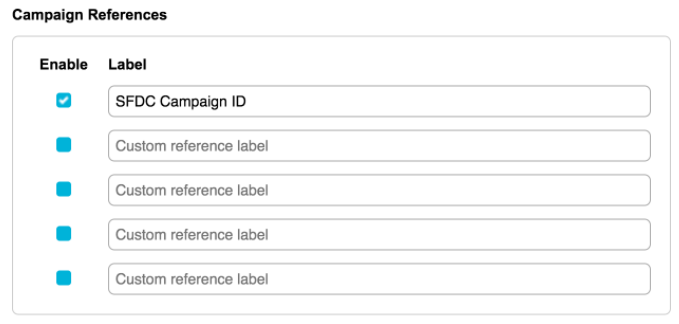
Go to Hello > Account Settings > Account Preferences > Campaign References > check box next to the first to enable > set label as “SFDC Campaign ID”
Once enabled, under Page and Email settings, a manage button will appear, allowing the user to create and/or link to the corresponding Salesforce campaign.
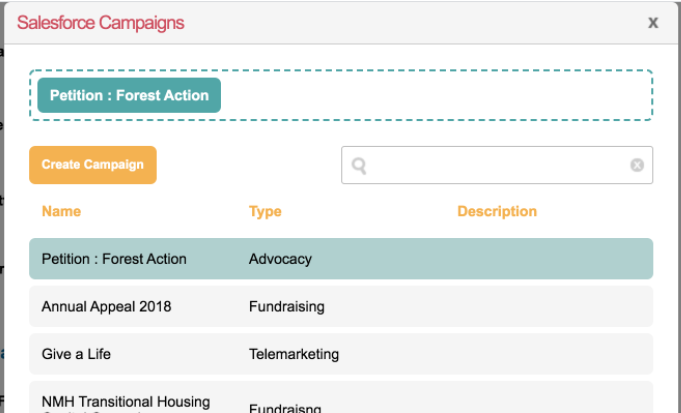
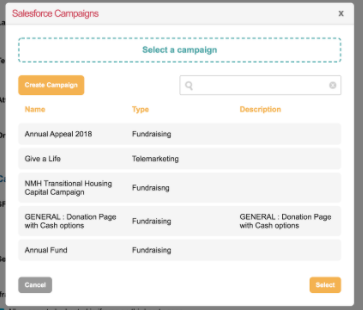
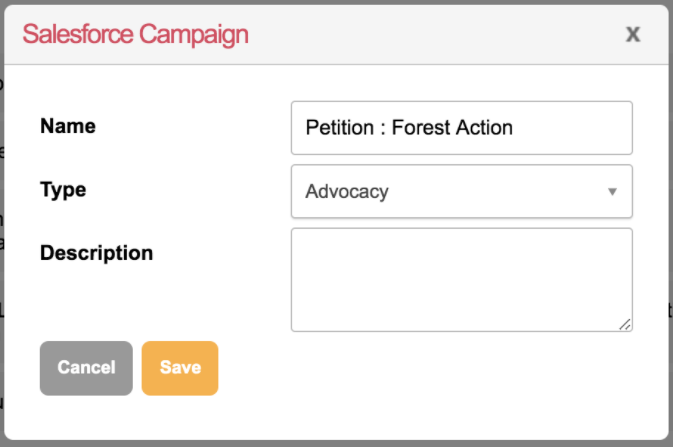
Clicking the Campaigns button opens up the layer to manage the Campaign link. Either select an existing campaign or click the Create Campaign button if none exists in Salesforce.
Once created, the campaign will appear at the top of the list. Click on the
intended campaign name and click the Select button.
This then populates the campaign reference in Engaging Networks with the Salesforce Campaign ID.