
The Paysafe Gateway, identified as Optimal Payments Gateway on Engaging Networks, can be used for card payments or Direct Debit payments in Canada (ACH or EFT), Europe (SEPA) or the UK (BACS).
Create your Paysafe Gateway
|
|
|
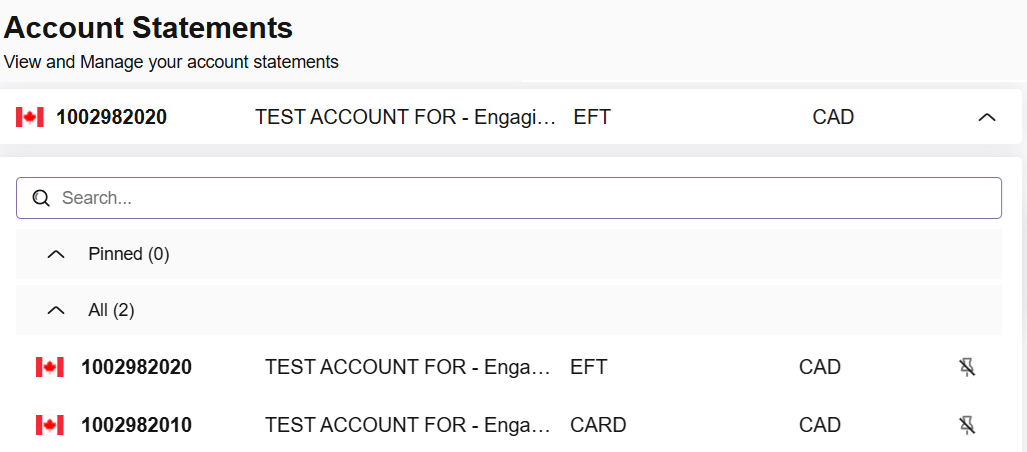
i. To find Account IDs, go to Business > Account Statements and use the drop-down. If you have a Card and Direct Debits enabled, you should see two separate account IDs: |
|
|
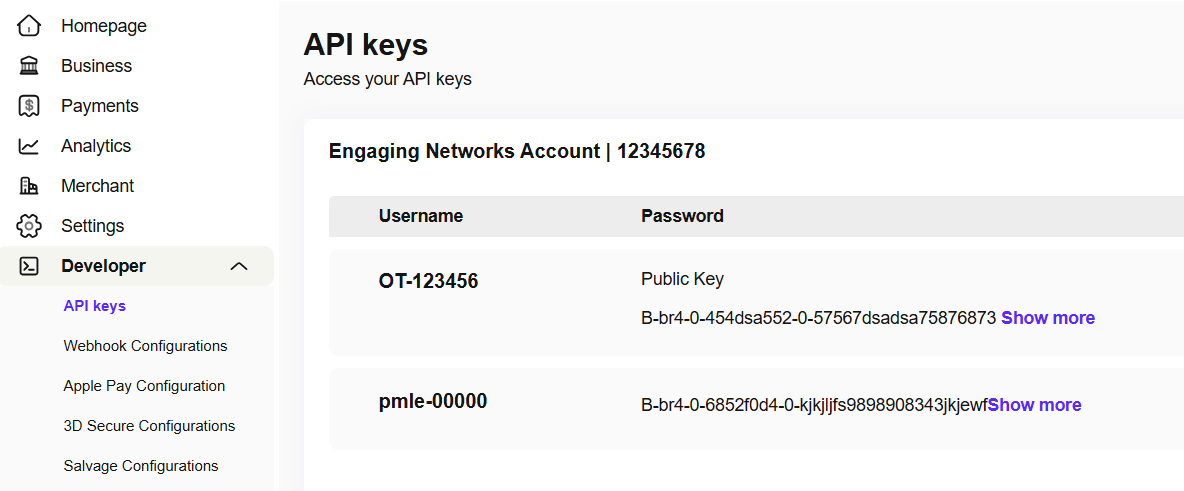
ii. To find your User Name and API Key, go to Developer > API Keys and authenticate to unlock the ‘secret’ key: |
|
When copying the API key, note that the “copy” button in Paysafe will also copy the username. Do not include the username in the API key value in Engaging Networks. Additionally, be aware that the user name and API key are the same whether you’re adding your card or a direct debit gateway.
-
In Engaging Networks, go to Hello YOURNAME > Account Settings > Gateways
-
Click ‘New payment gateway’ to create a new entry
-
The fields are set up as follows:
|
Reference name |
Paysafe operates separate gateways for card payments and Direct Debits.
|
|---|---|
|
Select gateway |
Select the Optimal Payments gateway |
|
Username |
Add the user name from your Paysafe account |
|
API key |
Add the secret key from your Paysafe Account |
|
Account ID |
The account ID from your Paysafe Account.
|
|
Currency |
Select the appropriate currency for the gateway. Note that changing this field in Engaging Networks will only change how currency is reported in our platform; otherwise, currency is determined by your Paysafe account. |
|
Test mode |
Should be checked for a test gateway, but must be unchecked for a gateway that will accept live donations. |
Form Fields
The following fields should be set up by using the appropriate field ‘tag’ in your account and added to the form on your page:
Standard Paysafe fields - Required for all payment types
|
Field Name |
Mandatory (Y/N) |
Field Type |
Description |
|---|---|---|---|
|
Email Address |
Y |
Alphanumeric |
Supporter’s email address |
|
First Name |
Y |
Alpha |
Cardholder’s first name. |
|
Last Name |
Y |
Alpha |
Cardholder’s last name.
|
|
Address 1 |
Y |
Alphanumeric |
Cardholders address |
|
City |
Y |
Alpha |
Cardholders city |
|
Region/State/
|
Y |
Alpha |
Cardholder Region.
|
|
ZIP/postal code/postcode |
Y |
Alphanumeric |
The post/postal/zip code of the cardholder |
|
Country |
Y |
Alpha |
Cardholder Country. Always use a 2-character country code as values. |
|
Donation Amount |
Y |
Numeric |
Entered as a whole number or with two decimal places. |
Card payment fields
These fields are required for card payments:
|
Payment Type |
Field Name |
Mandatory (Y/N) |
Field Type |
Description |
|---|---|---|---|---|
|
Card |
Credit Card Number |
Y |
Token |
Credit card number |
|
Card |
Credit Card Expiration |
Y |
Date |
Format must be MM/YYYY. |
ACH/BACS/EFT/SEPA payment fields
These fields are required for Direct Debit payments:
|
Field Name |
Mandatory (Y/N) |
Field Type |
Description |
|---|---|---|---|
|
Credit Card Holder Name |
Y |
Alpha |
Paysafe uses this for bank account holders only, as cardholders are captured using the First and Last Name fields. |
|
Payment Type |
Y |
Alpha |
Enter the appropriate value for your required payment type:
|
|
Bank Account Type |
Y |
Alpha |
CHECKING or SAVINGS or LOAN (Loan is for SEPA only) |
|
Bank Account Number |
Y |
Numeric |
The account number for the payment.
|
|
Bank Routing Number |
Y |
Numeric |
ACH or EFT: The payment routing number must be 9 digits for ACH.
|
|
Bank Name |
Y |
Alpha |
Required for EFT only and must be a numeric value. |
|
Recurring Payment |
Y |
Alpha |
Submitting ‘Y’ will flag the transaction as a recurring payment. Any other value will result in a single payment. |
|
Recurring Frequency |
Y - ACH/EFT |
Alpha |
If ‘Recurring Payment’ is set to ‘Y’. Permitted values are MONTHLY, QUARTERLY, SEMI_ANNUAL and ANNUAL. SEPA: If not submitted, will to MONTHLY. |
|
Recurring Start Date |
N |
Date |
An optional start date in the format |
|
Recurring Day |
N |
Numeric |
The day of the month on which the recurring payment should be taken, from 1 to 28. If the field is not submitted, the default recurring payment day will be taken from the “day” of the Recurring Start Date. If Recurring Start Date is not part of the submission, the recurring day will be set to the day of submission. |
Invalid Characters
To prevent invalid data from being submitted through your forms and causing errors, you can use validators on the form fields. Several built-in validator types can be created to handle standard Alphanumeric data or donation amounts. However, you can also create custom validators using regular expressions. When dealing with payment gateways, pay particular attention to input that could cause problems.
For Paysafe, the following list of characters should never be part of any data submitted as part of the Direct Debit setup, as it will result in an error:
|
Character |
Code |
Description |
|---|---|---|
|
“ |
22 |
Double quotes (or speech marks) |
|
; |
3B |
Semicolon |
|
^ |
5E |
Caret, circumflex |
|
* |
2A |
Asterisk |
|
< |
3C |
Less than (or open angled bracket) |
|
/ |
2F |
Slash or divide |
|
[ |
5B |
Opening bracket |
|
] |
5D |
Closing bracket |
|
\ |
5C |
Backslash |
Testing & Troubleshooting Paysafe donation pages
If your gateway is set to test mode, you can use the test card details below for testing. Further information on testing can be found on the Paysafes Developer website.
Testing using different donation amounts will simulate different response codes from the Paysafe gateway. You can verify that responses are being returned correctly by viewing the supporter record used for testing in Data & Reports > Lookup Supporter.
Test Credit Cards
For test credit cards, use any expiry date set in the future.
|
Card type |
Test card number |
Test card number |
|---|---|---|
|
Visa |
4530910000012345 |
4510150000000321
|
|
MasterCard Debit (Maestro) |
6759950000000162 |
5036150000001115
|
|
MasterCard |
5191330000004415 |
5191330000004415
|
|
American Express |
370123456789017 |
375529360131002
|
|
Discover |
6011234567890123 |
|
Response Codes
For testing these scenarios, you must be using a test gateway and include the decimal before the value. When setting up the donation amounts on your forms, you can use integers with or without the decimal included.
Troubleshooting
EFT will not work on event pages.
If you’re experiencing issues when trying to process test or live donations after following the setup guide, firstly, verify that customer records are being created in Paysafe and that error messages are being created against the transaction on the supporter record.
ACH/ EFT Behavior and Data
When a Paysafe ACH or EFT payment is submitted by a supporter, you will see two FBR transactions created over time. These are:
-
A transaction for the supporter submitting the payment, which will initially have a status of “Pending” until Paysafe confirm whether it was successful
-
This is followed later by a “change” transaction, which details the change of status from “pending” to “success” or “reject” once Paysafe confirms
Example data
In the explanation, we’ve abbreviated “Campaign Data” to “CD” for clarity.
-
Row 1: Column headings. We’ve selected the most important columns for this explanation. All of them will have a Campaign Type of “FBR”
-
Row 2: Initial payment. Here the supporter made an ACH for $10 a month, on the 27th of August (first row), with a Recurring Day of 27 (CD 8). It is initially recorded with a status of “pending”
Data from the Bulk API (which uses staged data) will always show a “pending” status here, but live exports will eventually show the updated status.
-
Row 3: Payment request status change: Several days later, after the transaction has settled in Paysafe another FBR row of data is created. This shows that the status was changed from “pending” to “success”. Campaign Data 2 is the same as the previous transaction since this change relates to that transaction. The Campaign Data 23 is the parent ID and can be used to match the ‘change' FBR to the relevant recurring series in CD11 (CD2 of the first in the FBR series).
|
Supporter ID |
Campaign date |
Campaign Status |
Campaign Data 2 |
Campaign Data 4 |
Campaign Data 8 |
Campaign Data 11 |
Campaign Data 21 |
Campaign Data 22 |
Campaign Data 23 |
|
250709073 |
2026-08-27 |
pending |
NDXXXXXXXXXXXXXXXX__j79747da-1a3c-2e7f-afa2-e5d7aff4b0b2__XtsiPyGL7hjkul7 |
10 |
27 |
Blank for the first transaction in a series. Subsequent transactions will have the ID from CD2 |
|
Optional transactional field value ‘Other 1’ |
Optional transactional field value ‘Other 2’ |
|
250709073 |
2024-09-01 |
change[] |
NDXXXXXXXXXXXXXXXX__j79747da-1a3c-2e7f-afa2-e5d7aff4b0b2__XtsiPyGL7hjkul7 |
10 |
27 |
NDXXXXXXXXXXXXXXXX__j79747da-1a3c-2e7f-afa2-e5d7aff4b0b2__XtsiPyGL7hjkul7 |
pending |
success |
NDXXXXXXXXXXXXXXXX__j79747da-1a3c-2e7f-afa2-e5d7aff4b0b2__XtsiPyGL7hjkul7 |