Skip table of contents

Smart Pages

Engaging Network’s Smart Pages is a new page-building experience that sits alongside our existing flagship product page builder. Where Engaging Networks Page Builder has provided clients with total flexibility and customisation of their pages, Smart Page simplifies and accelerates the process of creating and launching fully optimised out-of-the-box fundraising pages.

Currently, Smart Pages is only available for fundraising pages, and this guide will take you through the two simple steps required to set up your fundraising Smart Pages.

To access smart pages:

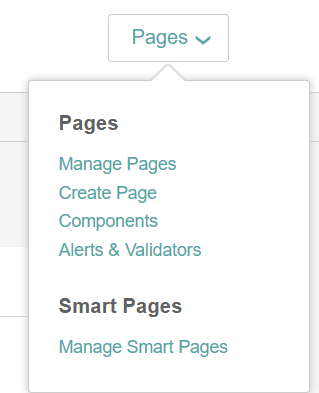
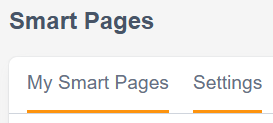
  1. Go to pages > smart pages > manage smart pages > and select either My Smart Pages or Settings

Picture of pages - smart pages - manage smart pages menu tab in Engaging Networks
image-20260304-150521.png

Manage Smart Pages Settings

Before building your first Smart Page, it’s recommended to set up your Smart Pages settings.

Smart Pages Setup

Once you have your Global Settings in place, you are ready to start building your smart page.

FAQS

Does it cost anything to use Smart Pages?

Smart Pages is free for any client who already has the license for our Fundraising module. If you’d like to add the Fundraising module to access Smart Pages, there would be an additional cost.

What gateways and payment types are supported in Smart Pages?

Smart Pages utilises the Stripe and PayPal One Touch (with the secret enabled) payment gateways for payment processing, so you can easily offer the modern payment options your donors expect, such as credit cards, Apple Pay, Google Pay, PayPal, and Venmo.

Can I link to smart pages from my broadcast emails?

Yes, you can, just select the smart page option in the link builder

Image of Engaging Networks link builder in broadcast emails

Will smart pages support page redirects

Page redirects from Smart Pages aren’t supported

Will Smart Pages have the same page scanning requirements for PCI compliance as the current payment pages?

We are not allowing any custom code on a Smart Page, therefore each individual page will not need to be scanned. Engaging Networks will be responsible for scanning one version of each Smart Page layout. However, if you are using the donation page pop-up modal on your organization's website (outside of the Engaging Networks hosted site), you would be responsible for scanning that code when you are fulfilling your website scanning requirements.

Will you be able to A/B test a Smart Page against a Page Builder page using native EN A/B Test page types?

No, there aren't plans for this at the moment. This is something we'll have to evaluate after Smart Pages is released and we begin to receive feedback. Currently, there are no plans for this; however, you can utilize the A/B testing feature in Marketing Tools to send donors to two different pages.

Will Smart Pages be available to use for other page types like sign-up pages and petitions?

Not initially. We are starting with fundraising pages and will evaluate an expansion into other page types as development continues. At the top of the list right now are sign-up pages and petitions, but we will scope out additional work and subsequent page types after the initial release.

What payment methods are NOT supported by Smart Pages

Bank payment methods (BACS, PDD, SEPA, iDeal), recurring PayPal, and recurring Venmo.

JavaScript errors detected

Please note, these errors can depend on your browser setup.

If this problem persists, please contact our support.