
Ireland Teachta Dál (TD)
Ireland TDs
Summary
|
Name |
IE / English : Ireland TD |
|
Major update schedule |
Bespoke |
|
Records |
160 |
|
Region |
Republic of Ireland |
|
Can it be used for Tweet-to-Target pages? |
Yes |
|
Can it be used for Click-to-Call pages? |
Yes |
|
Can it be used for Political Broadcasts? |
Yes |
|
Can it be used for Data Mapping? |
No |
The Republic of Ireland TD database contains the members of the Teachta Dála of the Irish parliament.
You can use this in Email to target pages for your supporters to send emails to their TDs, or you can send emails to the TDs from your own organisation using the Political broadcast tools.
This database is not postcode-mapped. If you want to use it in an email to target or a tweet to a target page, you need to have it uploaded as a custom database.
Description
For electoral purposes, the Republic of Ireland is divided into areas known as constituencies, each of which elects three, four, or five TDs. Therefore, each supporter will be contacting more than one TD when taking action.
If you wish to use this database, please contact your account manager or support team, who can add it for you.
Before using a custom database, you should ensure you have set up a custom envelope
Using this database in an Email to Target
As this database is not postcode-enabled, your supporters cannot use their postcode to determine their constituency and which TDs to target.
If you wish to use this database in an Email to Target (ETT), it will be set up as a custom database for you by the Support team, and you’ll need to use a Match Field so supporters can choose their constituency and thus their TDs.
1) Create an Irish Constituency field in your account data structure
The match field needs to be something your supporters can choose from your supporter database (the Account Data Structure). For example, you could create a new not-tagged field called “Irish Constituency”.
-
Leave the Field Tag as “Not Tagged”
-
Change the Default Field Type to Select. Click the “Edit select values” button. Choose “Import a list” and select “Republic of Ireland constituencies” and Import. Replace values and save the list (button is at the bottom of the list)
-
Save the field
2) Add the database as a Custom Database to your account
The support team can do this for you. They will match the Irish Constituency field from the custom database to the new field you added in step 1.
3) Create an Email-to-Target using the new database
We will summarise how to create the page here. If you are not familiar with creating emails to target pages, click here first.
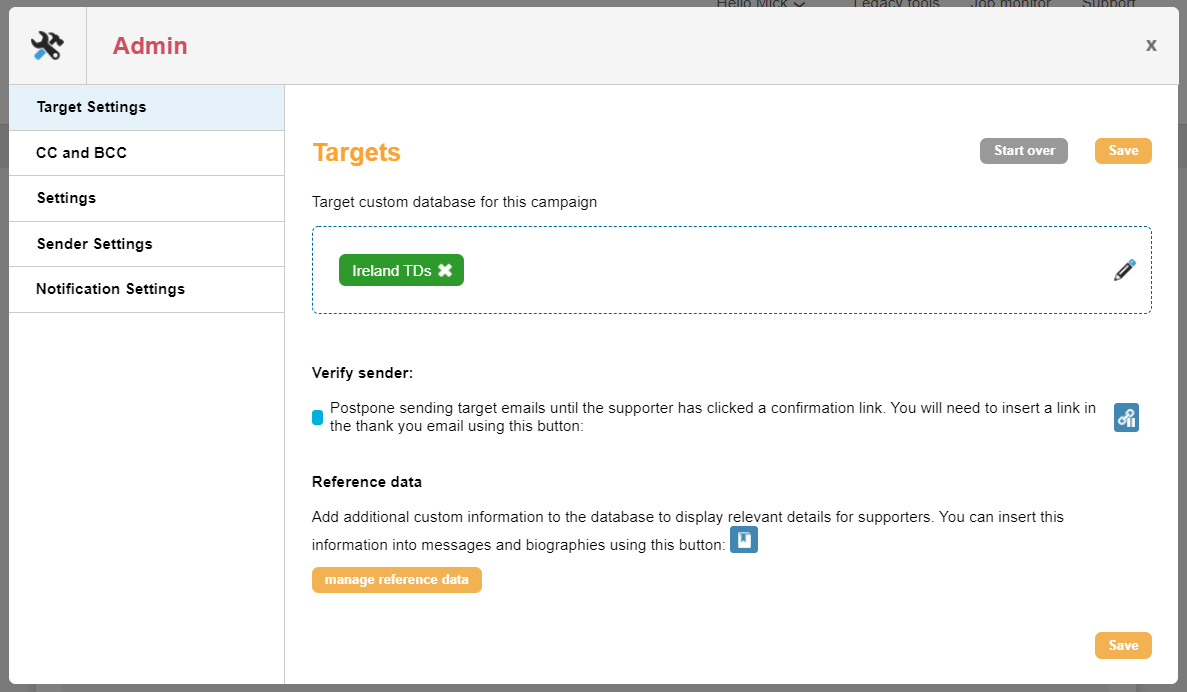
Create a new Email to Target page as usual. For the Target, choose a Custom Database and select the one that the Support team uploaded for you.
|
We will summarise how to create the page here. If you are not familiar with creating emails to target pages, click here first. Create a new Email to Target page as usual. For the Target, choose a Custom Database and select the one that the Support team uploaded for you. |
|
|
Complete the admin screen as usual. On the first page, ensure you include the Email Address field and the match field. On the second page, you should include the Target Block. You can use the following inserts if required:
The third page should contain a thanks message. Add a thanks email if required. |
|
4) Test and launch
Test the page as usual to ensure it looks correct and that the target emails and the thanks email look good. You can test the entire action during preview, as it will be in “Demo” mode, meaning the targets will not be contacted. Instead, you will see what email they would receive.
When ready, set the status to Live and promote the live URLs (not the demo URL).
Using this database in a Political Broadcast
If you wish to use the legacy broadcast tools to contact TDs directly, then this needs to be added to your account. Contact your account manager or support team to get it added.
Once added, the database is called IE / English : Ireland TD.
When selecting targets, you can use the following in the Contact Data filter:
|
Irish Constituency list: Carlow-Kilkenny | Cavan-Monaghan | Clare | Cork East | Cork North-Central | Cork North-West | Cork South-Central | Cork South-West | Donegal | Dublin Bay North | Dublin Bay South | Dublin Central | Dublin Fingal | Dublin Mid-West | Dublin North-West | Dublin Rathdown | Dublin South-Central | Dublin South-West | Dublin West | Dún Laoghaire | Galway East | Galway West | Kerry | Kildare North | Kildare South | Laois | Limerick City | Limerick County | Longford-Westmeath | Louth | Mayo | Meath East | Meath West | Offaly | Roscommon-Galway | Sligo-Leitrim | Tipperary | Waterford | Wexford |Wicklow |
|
Irish party list: Aontú | Fianna Fáil | Fine Gael | Green Party | Independent | Independents 4 Change | Labour | Sinn Féin | Social Democrats | Solidarity – People Before Profit |