
Subscribe to Engaging Networks communications to receive release updates via email.

|
FEATURE |
STATUS |
|
🎟️ Event Waitlist |
Released on March 26th, 2026 🎉 |
|
🤓 Smart Pages |
Released on April 9th, 2026 🎉 |
|
📲 SMS Inbox Manager |
Released on April 30th, 2026 🎉 |
|
📝 Form Abandonment |
Released on June 11, 2026 🎉 |
|
👭 Peer-to-Peer Multiple Fundraising Pages |
Released on June 11, 2026 🎉 |
|
➡️ Enterprise Salesforce Connector: Increased Sync Frequency |
Released in July 2026 🎉 |
|
📋 Smart Pages Petitions |
Released on September 3, 2026 🎉 |
|
📣 Advocacy Target Pools |
Released on September 3, 2026 🎉 |
|
|
In progress, scheduled for release in November |
|
📝 Marketing Tools Builder for Page Builder Autoresponders |
In progress, release TBD |
|
🛠️ Additional Page Builder Upgrades |
Discovery phase, timing TBD |
Disclaimer: Release dates, features, and functionality are all subject to change. As development progresses, sometimes priorities shift and we need to adjust our plans and this can impact timelines. We will do our best to update this information when features, functionality, and release dates are officially confirmed.
October 2026 - 6.6.1
Hotfix was deployed on Thursday, October 22nd at 3pm ET.
Bug Fixes
Blackbaud
-
Fixed an issue where supporters weren’t able to manage Blackbaud payments initiated by Engaging Networks.
October 2026 - 6.6.0
Release was deployed on Thursday, October 15th at 3pm ET.
Notable Updates
Smart Pages
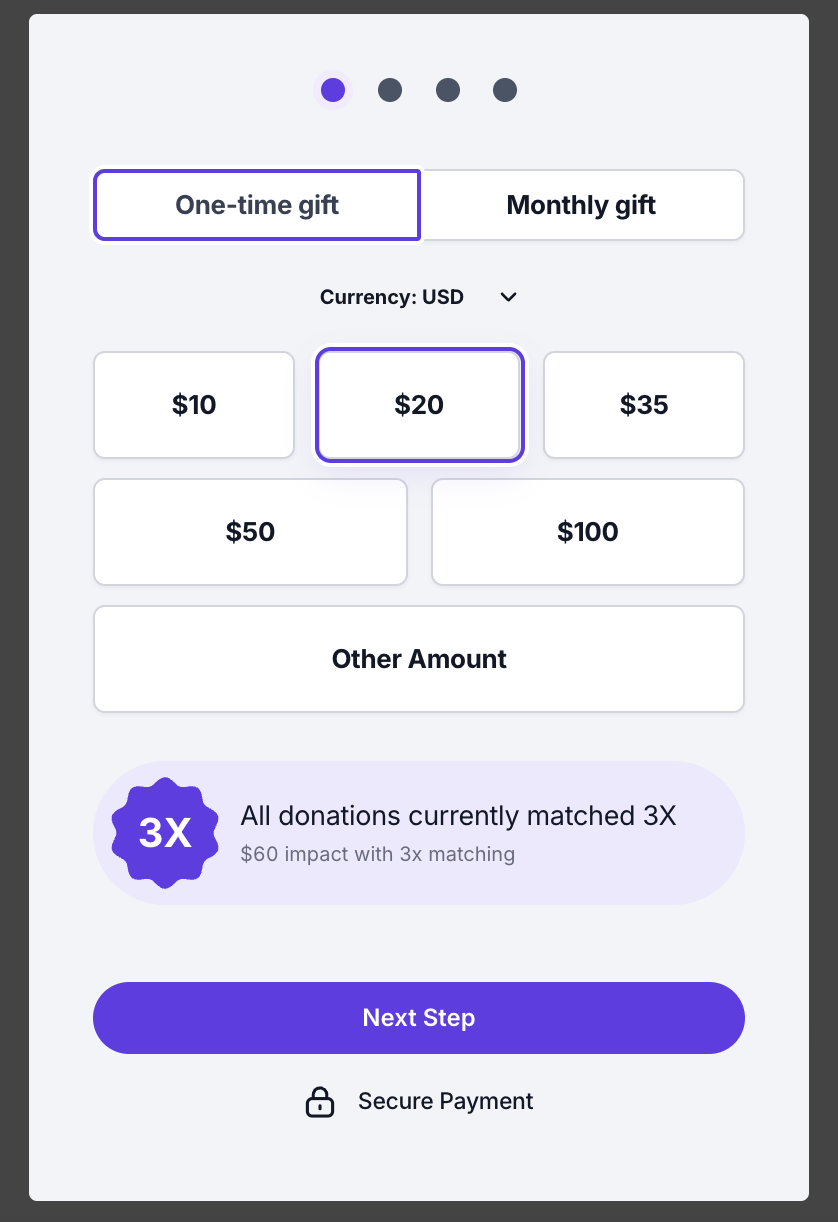
New feature: Matching Gift Badges
You can now boost donation revenue by enabling Matching Gift Badges on Smart Pages. Available under the Donation Boosters section in Page Features, this option will display a prominent and engaging match badge and real-time impact calculation on your donation form.
What’s New
In the page editor, you can customize the callout header and configure match multipliers (2x, 3x), dynamically updating the calculated impact amount as supporters select or enter donation amounts.
An eye-catching visual entrance animation for the Matching Gift badge is designed to increase visibility and donor engagement, with full built-in support for reduced-motion accessibility settings.
Peer-to-Peer
Modular Layout Builder for Public Fundraiser Pages
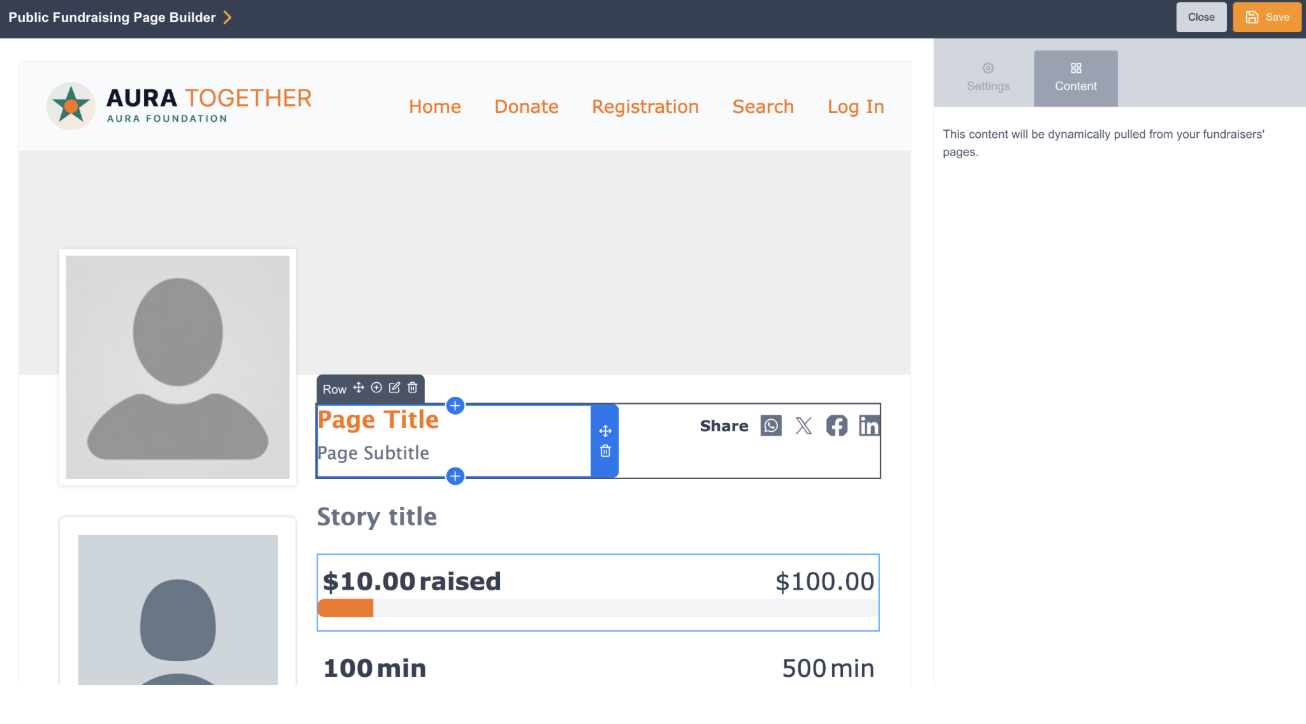
We’re excited to introduce a new modular, block-based page builder for Peer-to-Peer Fundraiser Pages, giving administrators direct control over the design, layout, and component arrangement of public-facing participant pages.
What’s New
-
Block-Based Page Builder: Customize your public fundraiser pages using a flexible drag-and-drop builder directly within Site Pages. Add, remove, and reorder content blocks to tailor page structure to your campaign's brand and storytelling needs.
-
Component Library & Visual Thumbnails: Easily insert and arrange standard fundraiser components.
Note: This initial release applies the modular layout builder to individual Fundraiser Pages. Modular builder support for Team and Organization pages is currently in development for upcoming releases.
Compliance
A new "PCI Compliance Reports" section is now available in the Security Center. This feature allows you to easily access and download your ASV scan reports and script attestation documents directly from the platform. Please note that your prior consent is required to access these reports. To provide consent for your organization, fill out this form.
Improvements
Target Pools
-
We've streamlined the advocacy workflow by allowing you to create new target pools directly within the ETT page via a convenient overlay. Newly created pools are also automatically selected for your convenience
-
You can now use target pools within your advocacy processing rules and redirect/filter settings. This update allows for more granular control, including the ability to trigger actions based on specific contacts or database values returned by the pool.
-
You can now use reference data with target pools to add more relevant details to your target block.
Smart Pages
-
Donate on Behalf of an Organization
Clients can now enable an organization gift option on the personal details step, allowing donors to give on behalf of an organization with full multi-language support, automatic receipt updates, and standard supporter.organization data mapping. -
Page duplication
Users can now duplicate existing Smart Pages directly from the list view with a single click, copying all page structure, styles, and card configurations into a brand-new page with an independent URL and editable content. -
Additional Customization for Petition Pages
-
Customisable Primary Button: users can customize the primary button caption on Smart Pages petition forms ensuring clear call-to-action messaging for your campaigns.
-
Contact & Address Fields: you can collect phone numbers and address details on Smart Pages petition forms. Clicking the personal details section in the builder opens an edit overlay where you can enable optional fields.
-
-
Page redirect on completion
We have introduced post-submission redirect options for Smart Pages. Clients can now redirect supporters immediately upon submitting a form (such as a petition or donation form) to either another Smart Page or an external URL.
When redirecting from one Smart Page to another, supporter details entered on the initial form automatically pass through and pre-fill the subsequent page, reducing friction and boosting multi-step conversion rates.
Please note: Redirecting to a Page Builder page will be introduced soon. -
Pre-Populating Supporter Data in Lightboxes
When launching a Smart Pages lightbox (such as a follow-up donation or petition) from a Page Builder Thank You page, supporter details entered during the initial submission are now automatically pre-populated in the lightbox form fields. This removes the need for supporters to re-enter their information and streamlines follow-up actions. -
Donation Notifications
We have introduced account-level Notification Settings for Smart Pages, enabling organization staff and team members to receive real-time email alerts whenever a donation is successfully completed on any fundraising page.-
A dedicated Notification Settings area is now available within Smart Pages settings, controlling notifications for all Smart pages.
-
Admins can easily toggle notifications on or off across all Smart Pages fundraising campaigns.
-
Initial functionality includes Donation Completed to alert internal team members as soon as a transaction processes. Notifications will include transaction summary, attribution data and tribute details if present.
Please note: additional notification types will be offered in subsequent release
-
-
Smart Pages: Fund Designation Transaction Mapping
You can now choose which transactional data field stores the fund designation code when a donation is processed on Smart Pages. In your designation settings, map the designation code to Direct Gift or Other 1–4 to ensure consistency with your reporting and transactional exports. -
Include external data in progress bar total
You can now incorporate offline signatures, external donations, or totals from other campaigns directly into your Smart Pages progress bars. When editing the progress bar component, you can specify an additional signature count (for petitions) or an additional amount raised with currency selection (for donation pages). These values are dynamically combined with live submissions collected on the page to display an accurate, comprehensive campaign total. -
Lightbox handling: Support for URL parameters
Added support for passing URL parameters (e.g., origin source, tracking IDs, appeal codes, and UTM/external reference fields) in lightbox embed code to record tracking and attribution data on submitted transactions. -
Smart Pages: Audit Logging for Opt-In Settings
We have introduced additional audit logs to track changes made to Smart Pages opt-in configurations. Audit logs capture updates to consent statements, email and SMS opt-in labels, and changes to selected opt-in questions across all active locales to support compliance and governance requirements. -
Improved handling of page content changes when accessing Page Settings
When navigating to Page Settings with unsaved edits in the Smart Pages editor, users will now be prompted with an unsaved changes alert. This allows you to choose whether to save your in-progress page edits or discard them before moving into settings, preventing accidental loss of changes. -
Smart Pages Editor – Top Bar Logo Settings
We have streamlined how users customize logo settings in Smart Pages. Logo editing controls have been moved directly into the on page editor canvas, replacing the previous overlay/modal workflow with a faster, inline configuration experience.
Marketing Tools
-
Refresh Email Template Button (Broadcasts & EMAs): Users can now update the email template applied to a message directly at the message level — without rebuilding the broadcast or stopping an active Email Marketing Automation (EMA)
Email Classic Deprecation
-
As part of our ongoing transition from the legacy email builder to our modern email tools, the ability to edit existing messages and send via Email Classic have now been removed. What Remains Accessible?
-
Message Previews: You can still view existing Email Classic messages and generate preview links for historical reference.
-
Historical Reporting: All reporting, metrics, and broadcast history for previously sent Email Classic campaigns remain fully accessible.
-
-
Clients will no longer be able to create new emails using the legacy builder in Email Marketing Automation. Existing emails built with the legacy builder can still be edited, and existing EMAs can still be duplicated.
Twilio
-
To ensure continued reliability and access to the latest features, we have upgraded our Twilio integration to the latest Java Helper Library. This update improves how we handle API responses and prevents potential service interruptions.
Gateways
-
Vantiv: We've improved Apple Pay processing ensuring supporter address information, including zip codes, is now correctly passed to the gateway.
-
Blackbaud: We've updated ACH transaction processing to ensure donor names are correctly displayed for all subsequent recurring payments.
Query Builder
-
Updated the Geolocation filter in Query Builder with a modern radius-based selection interface aligned with Segments, allowing users to easily define multiple geographic radii by distance, unit (miles/km), and location.
Reporting
-
Updated Hard and Soft Bounce CSV exports to match the UI view so they now include granular bounce reasons, bounce dates, and the associated email broadcast for each supporter record.
Facebook Lead Forms
-
We’ve updated the backend code of our Facebook Lead Forms integration to the latest Meta Graph API, making it simpler and faster to connect your accounts. You can now authenticate and connect Engaging Networks using standard Meta Business Suite access, removing the need for granular, page-level permissions.
Salesforce Connector
-
We have upgraded our Salesforce integration to utilize the latest Salesforce REST API version (v67.0). This update ensures long-term compatibility with Salesforce and expands field mapping capabilities across standard Salesforce objects.
Other
-
Improved the 2FA login experience by automatically focusing the cursor inside the 2FA code input field upon page load (no click required to start typing) and allowing the 2FA code to be submitted by hitting enter (no need to click "Submit" anymore!).
-
Master Admin users are now visible and editable within the Master Account user management interface. Administrators can now update account details and enforce Two-Factor Authentication (2FA) on Master Admin profiles to enhance account security.
Peer-to-Peer
-
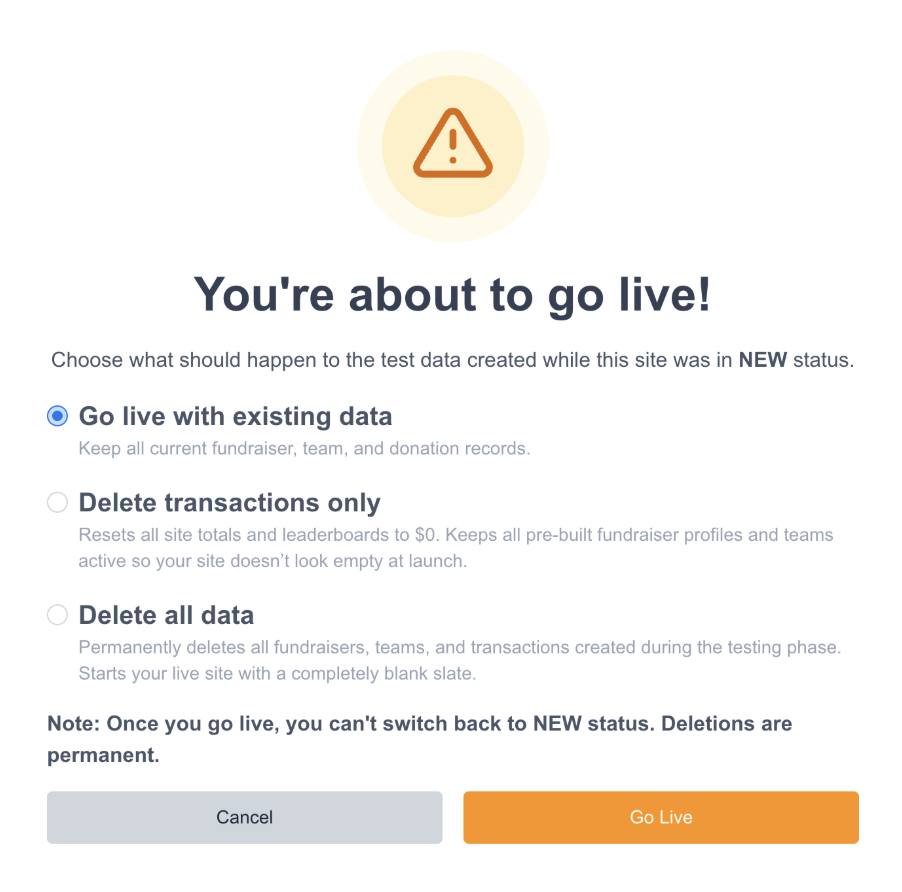
Clean slate launch options when setting sites to LIVE: When transitioning a Peer-to-Peer site from NEW to LIVE status, site administrators can now choose how to handle test records, registrations, and dummy transactions created during the build and testing phase.
-
Key Capabilities & Behavior
-
Automated Capacity & Leaderboard Resets:
-
Clearing transactions resets all site thermometers and leaderboards back to $0.
-
Clearing test fundraisers automatically releases occupied registration slots back to your event participation capacities and resets participant counts to zero.
-
-
Built-in Confirmation Safeguards: Selecting any data deletion option triggers a secondary confirmation step to prevent accidental removals, as transitions to LIVE and data cleanups cannot be undone.
-
Safe Transaction Handling: Resetting test transactions decouples them from the P2P campaign metrics but keeps the actual financial transaction in-tact making sure no data is lost.
-
-
-
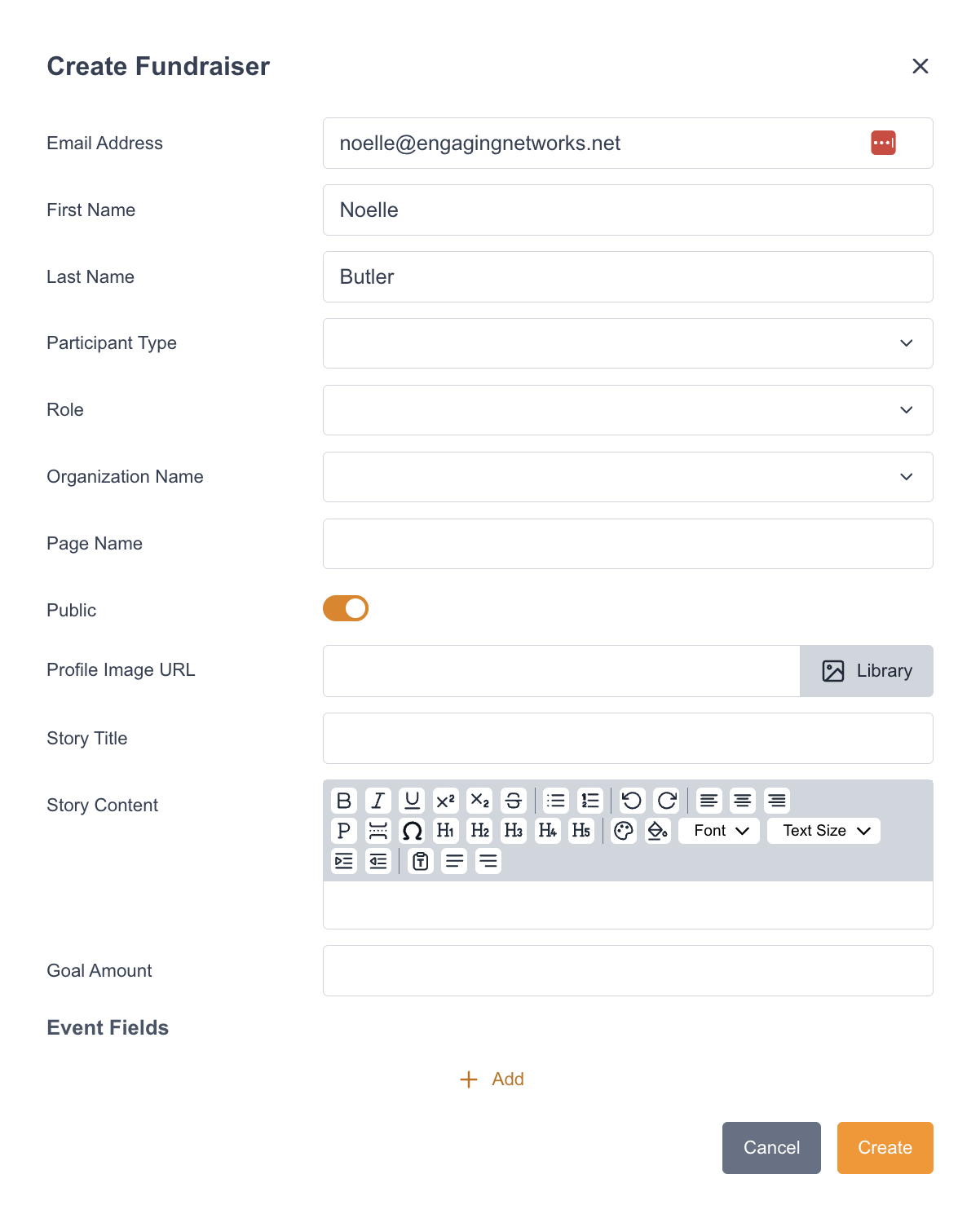
Manually add fundraisers from the Fundraiser Management screen: Admins can now create individual fundraiser pages directly from the fundraiser management interface — selecting a participant type, assigning roles, and matching or creating supporters by email — without needing to prepare a CSV import.
-
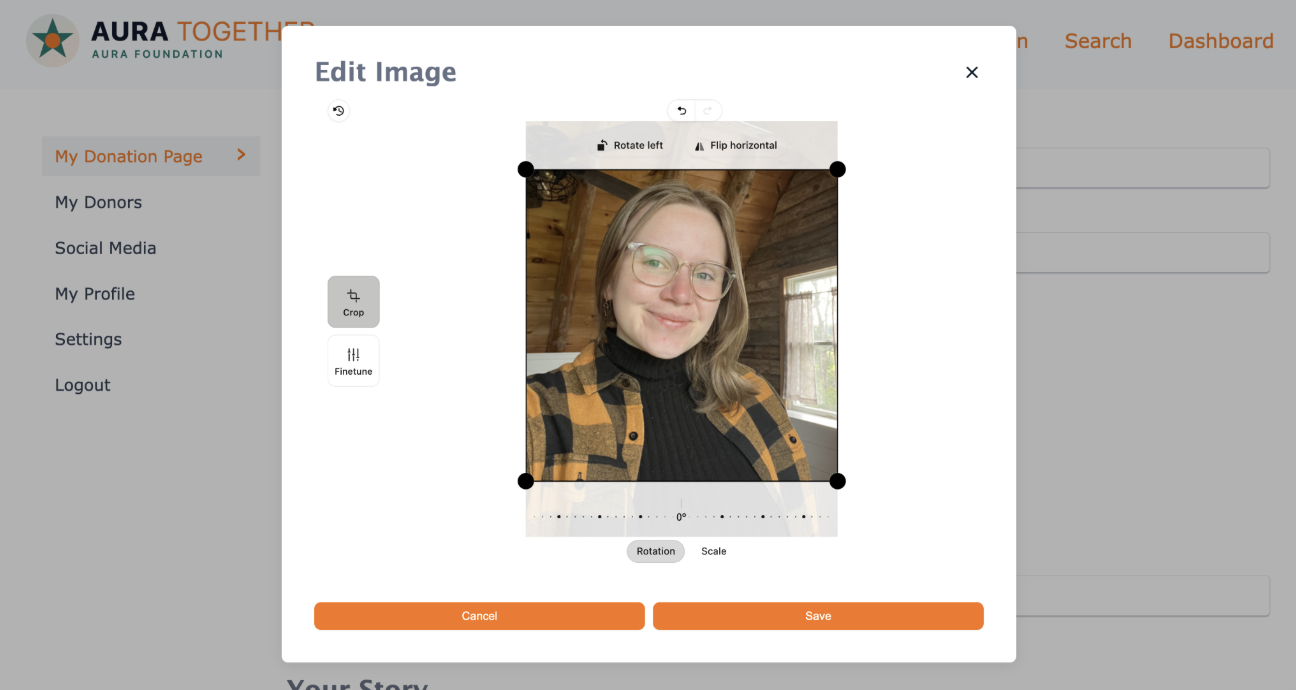
In-App Profile Image Editing & Fine-Tuning: Fundraisers can now crop and fine-tune their profile pictures directly within the Fundraiser Dashboard for both individual and team fundraising pages.
-
View My Page block: You can now add a View My Page block anywhere within the Fundraiser Dashboard editor. This gives fundraisers a prominent, one-click link to view their live public fundraising page in a new browser tab. Administrators can customize the link text directly in the sidebar settings (default: "View my donation page").
-
QR Code Block for the Fundraiser Dashboard: We’ve added a dedicated QR Code block to the Peer-to-Peer Fundraiser Dashboard. Fundraisers now automatically get a unique QR code on their dashboard that links directly to their personal fundraising page—making it easy for donors to scan and give in person at events or on the go. Admins can style and configure the QR Code block within the page editor, including color customization.
-
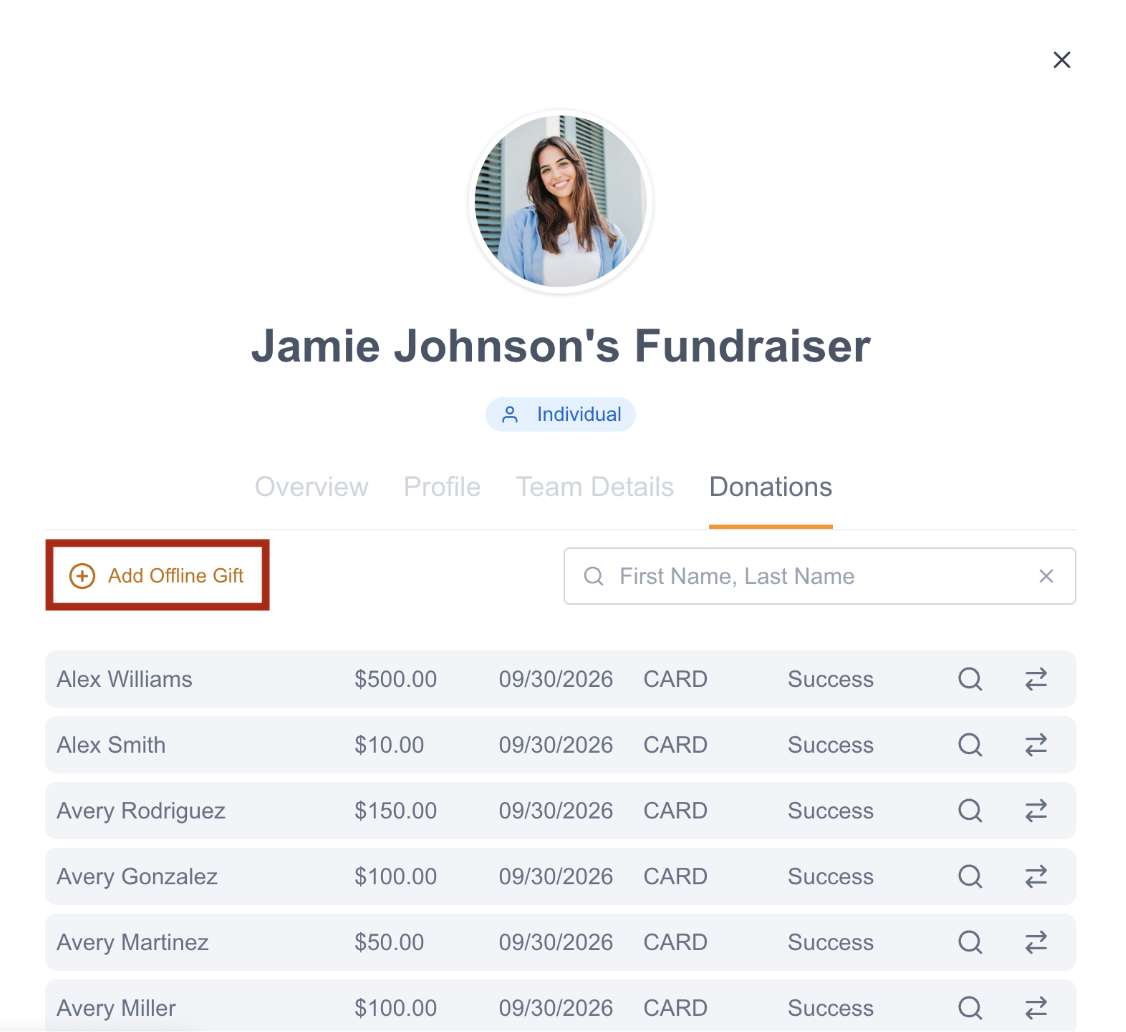
You can now log offline gifts directly within the Fundraisers → Edit Fundraiser → Donations and Teams → Edit Team → Donations modals. Clicking ‘Add offline gift’ opens the standard offline gift overlay with the fundraiser or team pre-selected and locked in the ‘Credit to’ field, reducing workflow steps and ensuring donations are accurately attributed.
-
You can now collect a custom public Donor Display Name directly on your Peer-to-Peer donation pages by adding the Shipping First Name and/or Shipping Last Name tagged fields to your forms. If both fields are submitted, they are automatically concatenated (or used individually if only one is present) and published to public donor rolls.
-
We've added the ability to set a default value for Text-type fields on the Peer-to-Peer registration form.
Bug Fixes
Smart Pages
-
Resolved an issue where autoresponder email logos were not scaling correctly on mobile devices (specifically in mobile email clients such as Gmail). Logos in newly generated smart page autoresponders will now consistently respect your configured width and display correctly on mobile devices. This is a fix that needed to be made at the template level, so unfortunately it will not apply to pre-existing Smart Pages.
-
Resolved an issue where supporter merge tags in autoresponder subject lines were not rendering in sent emails.
-
Updated donation confirmation screens to dynamically display translated recurring gift frequencies (monthly, quarterly, annual) matching the active page locale.
Page Builder
-
We've resolved an issue where changing a prefilled email address on EN pages could cause a session issue. Our pages now correctly handle supporter email changes by either updating the existing supporter record (details and not email address) or creating a new one, ensuring all transactions are processed and attributed accurately.
-
Fixed an issue where the existing value in the Email Tracking field was not populating on page load from an email.
-
Resolved an issue where supporters who completed a donation on pages configured to redirect to an external/separate thank-you page could still receive an automated donation abandonment email. Abandonment triggers now correctly recognize successful submissions regardless of the thank-you page destination, preventing erroneous follow-up emails from being dispatched.
Reporting
-
We've fixed a bug in the Report Builder where recipients who were removed from scheduled reports continued to receive them.
-
We've resolved a currency conversion issue in the Recurring Donation visual report. The report stats now correctly reflect your chosen reporting currency for all recurring donation categories.
-
Resolved an issue in the Segment Builder where using the "during the last # days" selector on calendar-formatted supporter data fields returned unexpected records with future dates. Date queries using this qualifier now properly restrict results to the designated past timeframe up to today, excluding any future-dated records.
Zoom
-
Fixed an issue where event pages could use an expired Zoom access token, causing intermittent "Failed to retrieve webinar" errors and failed registrations.
Gateway
-
Fixed an issue where Content Security Policy (CSP) rules blocked 3D Secure verification from some card-issuing banks on pages using the Paysafe gateway.
-
Fixed an issue where donation pages using PayPal did not populate a supporter’s first and last name if those fields were left blank on the donation form. The system now automatically pulls the donor's first and last name directly from their PayPal account when they are not submitted on the page
-
Fixed an issue where card transactions using Stripe requiring 3D Secure could fail prior to payment completion.
-
Fixed an issue where certain Blackbaud transactions failed with error 44 related to the application_fee parameter. The gateway payload has been updated to remove this parameter from transaction requests.
Marketing Tools
-
Fixed an issue where broadcast reporting for split tests using Message Level Links displayed randomly generated fallback names instead of custom link names for external links. Link click reporting now accurately reflects the custom-assigned link names across all split test variations and messages.
-
Fixed an issue where Supporter Hub auto-login links sent via Email Broadcasts and Automation did not authenticate supporters who had opted out of email tracking.
-
Previously, if an email sending domain was authenticated and later had its configuration changed such that it failed authentication in EN's tool, clients were able to continue sending email from these unauthenticated domains. This has been fixed to properly block sending when the authentication tool returns a failed result for a previously authenticated domain.
Marketing Automation
-
Fixed an issue in Marketing Automations where tracked links in Email and SMS automation messages defaulted to standard system URLs instead of using the client's configured custom subdomain.
-
We have updated the conditional evaluation logic in Email Marketing Automation (EMA) for decisions based on Supporter Information > Field Value. When using a "does not equal" (!=) condition (e.g., Field value does not equal "Y"), supporter records with empty or blank values are now correctly evaluated as satisfying the condition.
Peer-to-Peer
-
There was previously an issue where the fundraiser links included in Peer-to-Peer registration notifications were built on the site subdomain instead of the client's EN subdomain, meaning the links did not work to load the Edit Fundraiser modal directly from the notification. This has been fixed.
-
Fixed an issue where existing field values were not properly populating on the Fundraiser Dashboard > My Profile section.
-
There was previously an issue where concurrent registrations on Stripe checkout pages could process a payment for a supporter even after the final participation slot had already been taken. This resulted in fundraisers being charged for registration without securing a ticket. This has been fixed.
-
Fixed an issue where newly activated Team Captains encountered an error ("Primary participant is not active") when adding dependents from the Fundraiser Dashboard shortly after registration. The participant activation status is now immediately synchronized, allowing Team Captains to add and manage dependents right away.
-
Added self-referencing rel="canonical" HTML tags to Peer-to-Peer pages, including site homepages, participant pages, and team pages. This ensures search engines like Google correctly recognize authoritative URLs, preventing "Duplicate without user-selected canonical" errors and improving page indexing across P2P sites.
-
Fixed an issue where fundraisers who used a 100% discount code at checkout were incorrectly redirected to the Checkout page on login to the fundraiser dashboard.
September 2026 - 6.5.2
Hotfix was deployed on Thursday, September 23rd at 3pm ET.
Bug Fixes
Target Pool Databases
-
Fixed an issue where if a user added the Senate and Congress target databases, only the Congress target database showed up. Both the Senate and Congress databases will now appear.
P2P Coaching Email Fundraising metrics
-
Fixed an issue where the P2P Coaching Email Fundraising metrics incorrectly included pending and rejected transactions. Pending and rejected transactions are no longer included.
ACSS Canadian Bank transactions
-
Previously, if a mandate ID was not included in the payment intent to tell the system that the donor has given us the authorization to capture this payment then there was an issue with failing ACSS recurring tokens. This issue has been fixed.
September 2026 - 6.5.1
Hotfix was deployed on Thursday, September 10th at 1pm ET.
Bug Fixes
Target Pools
-
Resolved an issue in Target Pools where searching within fields containing large datasets (1,000+ entries) failed to return results.
-
Reduced database clutter by removing test databases.
September 2026 - 6.5.0
Release was deployed on Thursday, September 3rd at 3pm ET.
Notable Updates
Marketing Tools
Dynamic Email Tracking Consent Controls
To help organizations align email communications with regional data protection standards and internal privacy policies (such as recent guidance from France's CNIL and Italy's Garante), Engaging Networks is introducing new Email Tracking Consent controls.
This feature allows your organization to control whether individual supporters receive standard email tracking elements (open pixels and link redirect tracking) or clean, un-tracked messages on a per-supporter basis.
To learn about how this works, please visit our detailed Supportal article here.
Advocacy Module
Target Pools
We are excited to introduce our new Target Pool feature – a redesigned target selection experience for the Advocacy module. Target Pools will eventually replace the existing multi-step database and target identification workflow for Email to Target (ETT) pages with a streamlined search-and-build approach, enabling clients to curate reusable target lists across multiple databases. Clients can now create named target pools by searching across available databases (postal and custom targets) for relevant fields such as party and district (soon!), and then adding individual or bulk targets to the pool.
Key capabilities include:
-
Multi-database support: mix and match targets from multiple postal databases and custom targets into a single reusable pool.
-
Search-based target selection: filter targets using available fields for each database (name, party, district, committee, city, region, etc.).
-
Reusable pools: save target pools and reuse them across advocacy ETT pages.
-
Target pool management: a new management page with support for foldering, search, duplication, editing, and deletion.
US House and Senate Databases
Engaging Networks uses the Communicating with Congress API to target the US House and Senate. That API added additional support for Supporter Title field values, and now any value can be submitted. Previously, Dr., Mr., Mrs., Ms., and Miss were the only supported values.
Smart Pages
Petition Pages
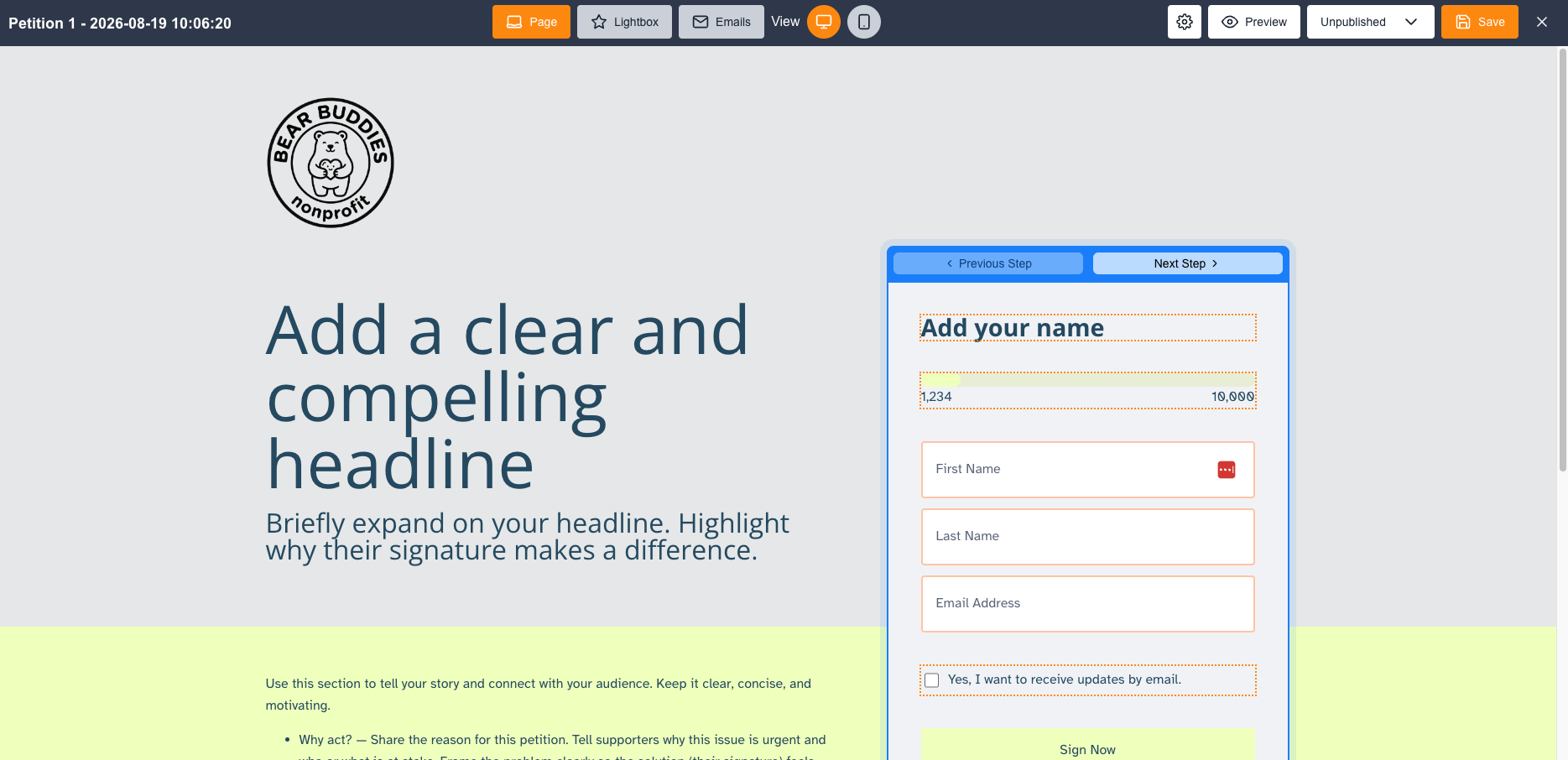
Create beautiful, optimized petition forms in minutes with the new Petition page type in Smart Pages.
Key Features:
-
Collect the key information you need from your supporters using an easy to set up petition form.
-
Customise the footer.
-
Use a progress bar to showcase your signature goal, and choose to automatically increase that goal when it’s reached, ensuring you never lose momentum.
-
Embed your petitions directly onto your website to collect signatures from anywhere.
-
Add social media share icons on the confirmation screen to allow supporters to share the petition.
-
Launch your petition in additional supported languages.
Super-charge your campaigns with the first advocacy page type available in Smart Pages.
Visit our Academy for training on Smart Pages, including a new lesson on setting up a petition.
Lightbox abandonment
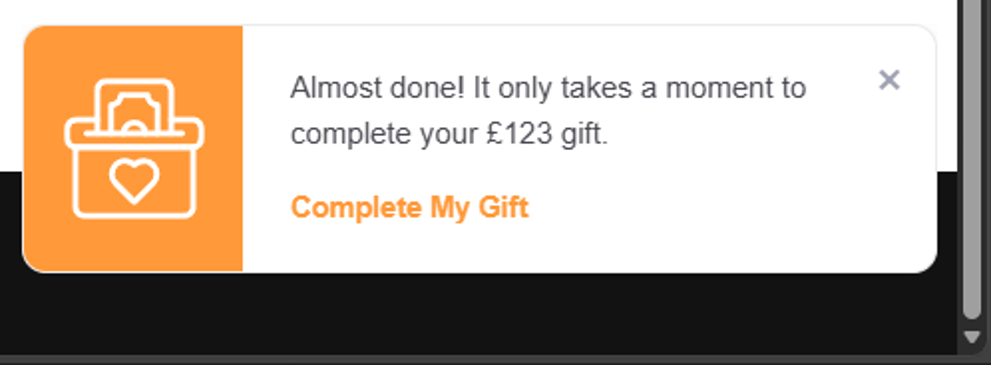
A new abandonment recovery widget is now available for Smart Pages lightbox donation forms. When a donor closes the lightbox before completing their gift, a small widget, displayed using the Primary Brand Color (set in Form Styles) of your page, appears to encourage them to finish their donation. This can be toggled on or off at the page level.
Gateways
Blackbaud Gateway: Upgrade to New Checkout Experience
The Blackbaud gateway has been upgraded to Blackbaud's New Checkout, delivering an improved payment experience and expanded payment method support.
What's new:
-
New Checkout experience — donation pages using Blackbaud now use Blackbaud's latest checkout flow.
-
Supports Google Pay.
-
Supports Apple Pay & Google Pay recurring.
-
Direct Debit — now supports USD, CAD, AUD, GBP.
Improvements
Smart Pages
-
Page-level parameter defaults in Smart Pages Settings: Smart Pages now includes a new "Page Data" tab within Page Settings, enabling clients to configure default transactional values directly at the page level. Supported fields include:
-
Campaign Codes — Set default Appeal Code and Origin Source values
-
Campaign References — Set default values for custom campaign reference fields (Ext Ref 6–10), including Salesforce Campaign ID
-
All configured values are automatically written to every transaction processed on the page and are visible in exported transaction data. Existing URL parameter overrides continue to function as expected, taking precedence over page-level defaults when present.
-
Page performance data now displays in reporting currency: Page performance metrics on Smart Pages now show values in your account's reporting currency, as defined in your account settings. Previously, metrics could display in the original transaction currency, causing mismatches when donations were submitted in different currencies. All values and totals now convert correctly to your reporting currency for consistent and accurate performance reporting.
-
Default Amount & Frequency URL Parameters: Clients can now prepopulate a donation page's default selected amount and giving frequency via URL parameters, enabling targeted landing pages for specific supporter segments or campaign links.
What's new:-
‘amount’ parameter — Pass a numeric value in the URL to preset the default selected donation amount on page load.
-
‘frequency’ parameter — Pass a frequency value (e.g., one-time, monthly, quarterly, annual) in the URL to preset the default selected giving frequency on page load
-
-
Minimum Donation Amount Settings: Client administrators can now configure minimum donation amount threshold for one-time and recurring payments directly within the Smart Pages Payment Setup settings. Donation pages will validate donor entries against these thresholds and display a message if the amount entered is below the configured minimum.
-
Foldering: Users can now organise Smart Pages into folders, providing a structured way to manage pages. The folder system mirrors the existing framework used in Marketing Tools and Segments for a consistent experience across the platform.
What's new:-
Folder structure — Create, edit, rename, and delete folders (including nested subfolders) to organise pages logically.
-
Bulk actions — Select multiple pages and bulk move them into a folder, or bulk delete from the list view.
-
Folder search — Search folders by name from the list view and within the Move to Folder overlay.
-
Edit Folders overlay — Dedicated overlay for full folder management: add, move, edit, delete, and search folders without leaving the list view.
-
-
Page Search in List View: Users can now search for pages on the Smart Pages list view. The search field matches against page name, page ID, or slug, enabling quick navigation to specific pages without manual scrolling.
-
Improved consent logging for Smart Pages QCB transactions: Enhanced the supporter lookup transaction history to provide more accurate and detailed consent logging for Smart Pages submissions. The QCB transaction record now reflects the exact content presented on the Smart Page at the time of submission, improving auditability and compliance oversight.
Compliance
-
A new notification banner has been added to the Security Center, informing users about the upcoming ability to receive ControlCase ASV Scan Reports directly within the Security Center and prompting clients to complete the consent form.
Events
-
Introduced a new 'Order Summary' insert for event autoresponders, providing supporters with a consolidated and professional breakdown of their ticket purchases and total costs.
Gateways
-
In a previous release, we started marking initial Paysafe ACH/EFT transactions as pending until status was confirmed. In this release, we made additional checks for other cases to ensure accurate implementation.
-
Credit card details for Blackbaud transactions can now be updated via the Lookup Supporter tool.
Marketing Tools
-
Email Delivery Improvement: On August 27th and 28th, we completed a performance improvement to our email delivery infrastructure that has significantly improved campaign sending speed platform-wide. Since implementation, large email sends are completing 2.8-3.4x faster, which means tighter delivery windows, more predictable campaign timing, and better alignment between your scheduled send time and actual arrival times. No action is needed to take advantage of this improvement — it applies automatically to all sending. We continue to monitor delivery performance daily and will keep investing in the platform's reliability and speed.
-
Email Classic – Legacy Email Campaign Creation Removed
As part of the gradual retirement of Email Classic, the option to create new broadcasts using the legacy email builder has been removed as of this release. This means:-
The "New Campaign" option has been removed from the Email Classic list screen
-
The duplicate icon on the Email Classic list view has been removed
-
Please note: Existing Email Classic campaigns remain fully functional — users can continue to edit content and send broadcasts that were previously created using the legacy builder. This change only affects the creation of new legacy emails.
Users should use the Marketing Tools email builder for all new broadcast campaigns going forward.
-
Marketing Tools RTE: Paste from Word Improvements: Improved the "Paste from Word" functionality in the Marketing Tools Rich Text Editor (RTE) to deliver cleaner, more predictable results when pasting content from Microsoft Word.
What changed:-
Cleaner HTML output — Pasted content now strips unnecessary markup such as MsoNormal classes, inline fonts, and extra paragraph spacing introduced by Word, resulting in clean, editable HTML.
-
Accurate paragraph handling — Single and multiple paragraphs pasted from Word now render as standard <p> tags without additional whitespace or trailing line breaks.
-
Improved list pasting — Bullets and numbered lists pasted from Word now appear correctly within the RTE, without extra spacing or content rendering outside the editor.
-
Keyboard shortcut label — The paste shortcut hint now displays the correct modifier key based on the user's operating system (Ctrl on Windows, ⌘ on Mac).
-
Removed the "Paste from Word" button — The Paste from Word button has been removed and replaced by keyboard shortcuts such as Crtl V on Windows and ⌘ V on Mac.
-
Salesforce Connector
-
Laid the groundwork for upcoming improvements to the Salesforce Connector "Sync extended supporter fields" option.
Peer-to-Peer
Peer-to-Peer Site Status Configuration
Peer-to-Peer admins now have granular control over site behavior throughout the event lifecycle with a new Closed status and two new configuration toggles: Registration Open and Donations Open.
What's new:
-
Registration Open / Donations Open toggles — Available when a site is in Live status, these toggles let admins independently control whether registration and/or donation functionality is active on the site. When a toggle is set to Off, the associated CTAs and buttons are hidden across the site, and direct URLs display a contextual "closed" alert.
-
Closed status — A new site status that redirects all supporter traffic to a configured URL (e.g., next year's campaign site). If no redirect URL is configured, a "site not found" page is displayed.
-
Redirect URL configuration — Admins can pre-configure the redirect URL at any time, ahead of switching to Closed status.
Common use cases:
|
Scenario |
Configuration |
|
Active campaign (no change from today) |
Live · Registration On · Donations On |
|
Registration capped but donations still open |
Live · Registration Off · Donations On |
|
Post-event: site viewable but no transactions |
Live · Registration Off · Donations Off |
|
Site retired, traffic sent to new campaign |
Closed · Redirect URL configured |
Delete Fundraisers from Peer to Peer Sites
Peer-to-Peer site administrators can now permanently remove fundraisers and teams from their sites. This enables clean removal of test, spam, or invalid registrations without needing to rely on the BLOCKED status workaround.
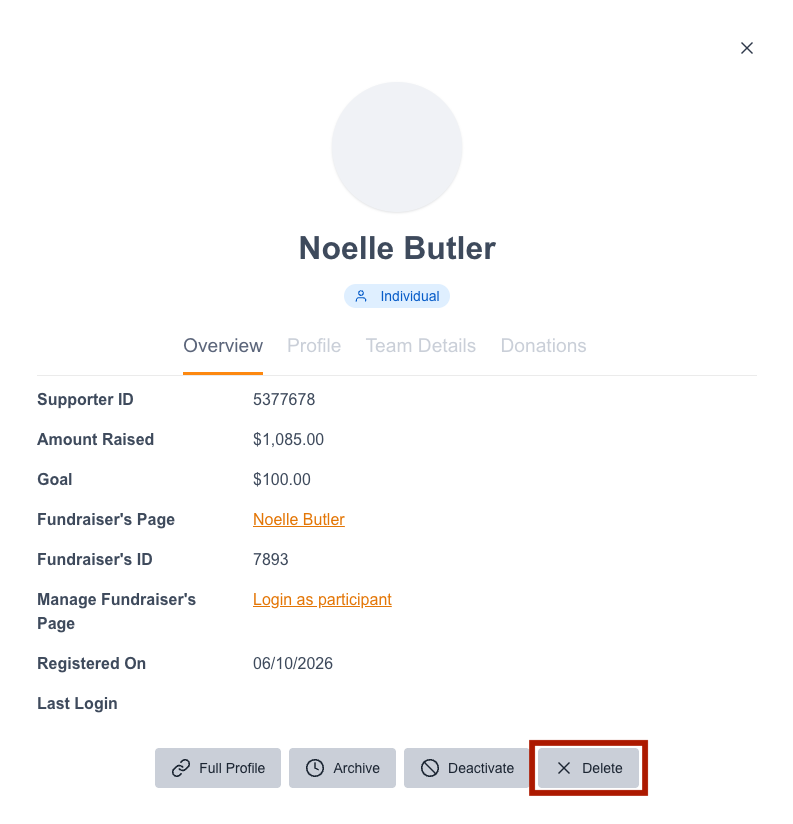
A new Delete button is available in the fundraiser and team edit overlay. Clicking it triggers a confirmation dialog clearly stating the action is irreversible and outlining the effects. Once confirmed, the fundraiser or team is permanently removed from the site.
Further documentation will be provided in advance of the release.
Email Toolkit block for the Fundraiser Dashboard
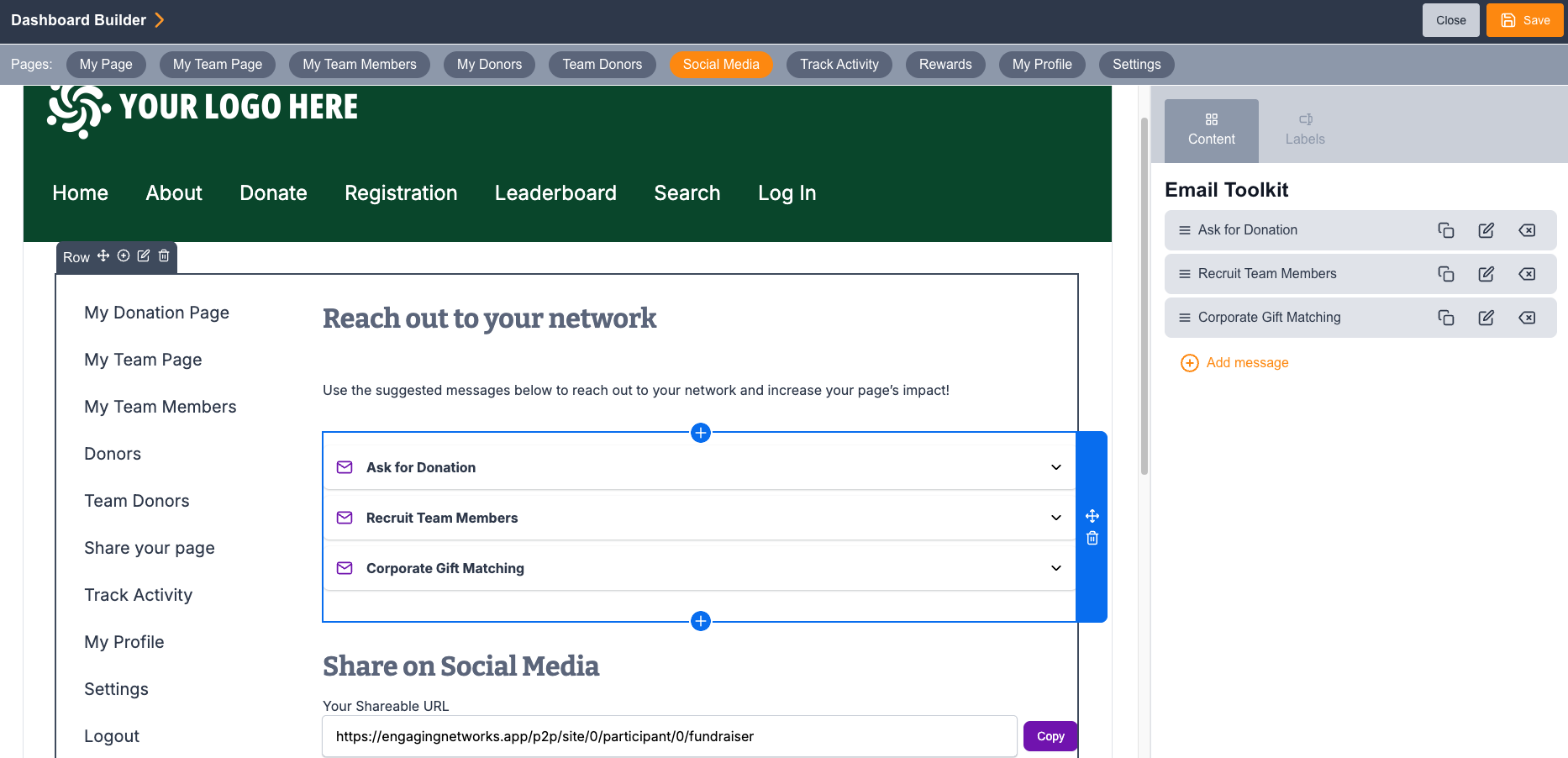
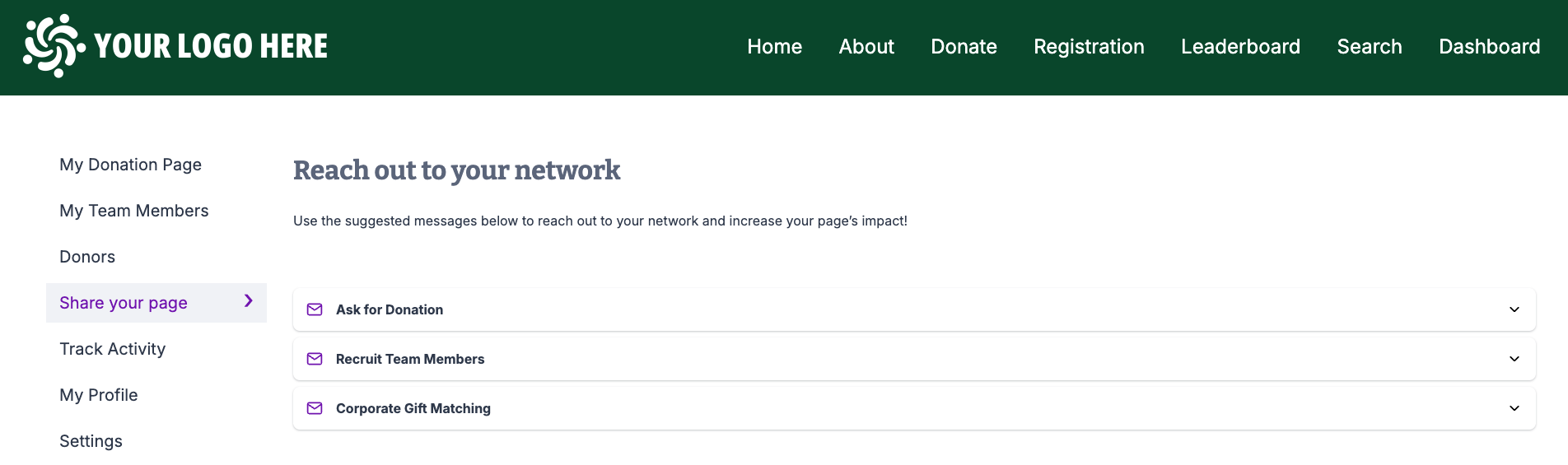
Admins can now add a configurable Email Toolkit to their fundraiser dashboard’s Social Media page, providing fundraisers with a library of pre-written, merge-tag-powered email templates. Admins can choose what sample emails to offer and customize the language to ensure it aligns with their brand standards. Fundraisers can send messages directly via their email client or copy content to their clipboard — making it easy to reach their personal networks with optimized messaging.
To get started, add the Email Toolkit block from the block library to the Social Media tab of your fundraiser dashboard.
Other Improvements
-
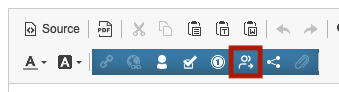
We have added the ability to insert Peer-to-Peer-specific merge tags into Page Builder autoresponder emails, allowing you to create more relevant and customized messages to your fundraisers or donors after they complete a transaction on your Peer-to-Peer site. These merge tags are available in autoresponders on Peer-to-Peer Checkout and Peer-to-Peer Donation pages and can be inserted using this icon in the blue toolbar:
-
Available merge tags include: Participant Type, Registration Fee, Additional Donation, Fundraising Minimum, Amount Left To Minimum, Site Name, Site Title, Site Event Name, Fundraiser First Name, Fundraiser Last Name, Fundraiser Page Name, Fundraiser Page Title, Fundraiser Page Image Url, Fundraiser Page Story Title, Fundraiser Page page Url.
-
-
To align Peer-to-Peer messaging tools with the rest of the Marketing Tools platform, the ability to add message level links has been added to the P2P email builder. Find more information here: Marketing Tools - Broadcasts - Setup, Audience and Email Builder | Knowledge | Engaging Networks
Bug Fixes
Smart Pages
-
Resolved an issue where Smart Pages abandonment emails failed to trigger for accounts that had the unsubscribe filter in exclusions disabled. Abandonment emails now fire as expected regardless of the unsubscribe exclusion configuration.
-
Fixed a display issue where an abandonment email content was showing in page edit view for pages without abandonment enabled.
Zoom
-
Fixed an issue where concurrent Zoom access token requests could intermittently prevent event registrants from being synced to Zoom.
Advocacy
-
Fixed an issue related to setting up a Regulations.gov campaign where user received the error "GUID not found".
Gateways
-
Blackbaud
-
Fixed a bug where the Blackbaud Gateway prevented the processing of free event tickets, ensuring all event types can be completed successfully.
-
Fixed an issue when processing Blackbaud recurring donations where clients were getting "Unable to get an access token".
-
Fixed an issue where selecting the cash or check option would still show the Blackbaud modal window.
-
-
Stripe
-
Fixed an issue affecting iDEAL donations (FBS) processed through fundraising pages that could send duplicate auto-responder emails for a single successful donation.
-
Resolved an issue on Stripe-enabled donation and symbolic giving pages where encountering a validation error (such as an inactive product selection) and then revising the gift amount could cause Stripe to process the initial amount rather than the updated total.
-
Previously there was an issue with delayed bank payments retrying indefinitely. This issue has been resolved so that cancelled delayed bank payments update properly in our system and don't continue retrying.
-
Marketing Automations
-
Fixed an issue where users could launch a marketing automation campaign targeting a segment without active filter criteria.
Bulk Export API
-
Fixed an issue where the Bulk Export API CSV file returned blank Date Modified values as unquoted empty fields instead of properly encapsulated empty strings (""), which could break downstream CSV parsers.
Salesforce Connector
-
Fixed an issue where disconnecting and reconnecting a Salesforce integration could continue using a stale cached access token from the previous connection. Upon disconnecting, access tokens will now be properly cleared.
-
Resolved an issue where the Salesforce contact push results job would fail with a database error when processing batches exceeding 1,000 campaigner records
-
Previously, you were able to select the same field twice in your Salesforce Contact Mapping, which would then produce sync errors. We have updated the Salesforce Contact Mapping selection screen to throw an error on save when the same field is selected twice..
Peer-to-Peer
-
Fixed an issue where editing a segment containing P2P data categories could fail for users without P2P permissions. All P2P data categories are now viewable and addable in segments and profiles regardless of P2P permission level
-
Previously, there was an issue that caused Peer-to-Peer URL slugs to expire after 90 days. This has been fixed so URL slugs created last indefinitely
-
A bug was identified where, under certain conditions, "Amount Raised" and "100%" milestone notification emails could trigger multiple times after a fundraiser initially met the threshold. Additional logic has been added to the notification engine to prevent duplicate sends. Once this fix is deployed, fundraisers who previously encountered the issue may receive one final duplicate of the relevant milestone email upon next meeting the condition. After that, duplicate emails will no longer be sent.
Note: Sites created after this release are unaffected by this issue.
Legacy Peer-to-Peer Maintenance
Our Legacy Peer-to-Peer tool deploys on a schedule separate from the rest of Engaging Networks. Maintenance updates will be included here in Release Notes and will include the date of the update.
Released on September 3rd, 2026:
Email Verification for Fundraisers
We are introducing an additional security layer for our legacy Peer-to-Peer product, which will allow for administrators to require email verification for fundraisers before their pages are publicly visible, helping to ensure the legitimacy of registrants before pages can go live.
This feature integrates with existing Manual Approval settings:
-
If Manual Approval is OFF: The page publishes automatically after email verification.
-
If Manual Approval is ON: The page enters the "Pending Approval" after registration, with a clearly marked “Verified/Not Verified” status for easier page review.
How to Enable
-
Navigate to Fundraising Options.
-
Locate the Email Verification toggle.
-
Switch the setting to ON.
-
Note: This is set to OFF by default for all sites. Turning it on for an existing site will automatically generate a new "Email Verification" email type if one does not already exist.
-
Other items:
-
We recently encountered an issue with pulling the Donor Summary report when large amounts of data were present. We have resolved this issue.
-
We’ve added a search bar to the “Review Pages” screen of legacy P2P sites using the Manual Approval feature so you can more easily find legitimate pages to approve. The search bar is case insensitive and can search on First Name, Last Name, or Email Address.
August 2026 - 6.4.1
Hotfix was deployed on Thursday, August 13th at 3pm ET.
Bug Fixes
Payment Gateways
-
Fixed an issue where transactions could fail with an "Invalid transStatus: N" error on Moneris Vault accounts that do not have 3DS enabled. The gateway now correctly bypasses unexpected 3DS authentication responses, preventing valid transactions from being blocked.
Query Builder
-
Previously, the Geolocation map selection within query builder was not allowing you to select a region or highlight an area. This has been fixed.
Marketing Automation
-
Resolved an issue affecting clients in the US2 data center where "View in Browser" links in Marketing Automation emails were not generating correctly. View in Browser links in Marketing Automation emails now render correctly across all US2 accounts.
Reporting
-
Fixed an issue where the new Opt-ins report displayed incorrect data due to a calculation error in the new opt-in rate. Additionally, the field previously labeled "review per opt-in" has been corrected to "Total Revenue" to accurately reflect the data being displayed.
Peer-to-Peer
-
There was an issue with Permissions where users without access to Peer-to-Peer sites were experiencing errors creating or editing profiles and segments. This has been resolved.
-
Additional logging was added to Peer-to-Peer registration logs to track ticket decrement logic on the back-end and aid with troubleshooting.
July 2026 - 6.4.0
This release was deployed on Thursday, July 23th at 3pm ET.
Notable Updates
Marketing Tools
We have made a number of improvements to the marketing tools to help clients simplify the process of creating and updating email messages.
Improved Block Handling in Broadcast Messages
With this release, you can:
-
View block names by hovering over the block’s 'i' icon.
-
Access the block library directly from the email editor, allowing you to make HTML updates without exiting the email creation process
-
Refresh a block to instantly pull in the latest block code.
Please note: Any customization you've made at the message level using replacements will be preserved when refreshing, unless that specific replacement is removed entirely from the core block.
Expanded Block Replacements for Marketing Tools
We've added new HTML and CSS replacement types for greater message-level flexibility. Set up these replacements at the template or block level and you can tweak specific styling and HTML code directly within your email editor for additional customization.
💡Watch our new Academy training on this feature
Marketing Tools Message-Level Appeal Link
You can now set a global destination link at the email message level, making it faster to update links across your email when creating a new appeal.
What's new:
-
Appeal Link setting — A new "Appeal Link" option at the message level lets you define a single destination URL (which can include your appeal code, direct gift parameters, or other data appends of your choice) that applies across the entire message.
-
Inherit Message Link — Individual buttons and links within the email can be set to "Inherit Message Link" using a new link insert tool, so they automatically pick up the message-level URL. No more clicking through each link one-by-one.
-
Per-link override — Links that need a different destination can still be inserted individually with a custom page and parameters, independent of the message-level setting.
-
Tracking parameters preserved — Existing message-level tracking parameters continue to apply regardless of which link approach is used.
Why it matters: Previously, updating an email with a new URL meant manually editing every button and link. This feature lets you manage your main call-to-action centrally and update all inheriting links in one step, saving you valuable time.
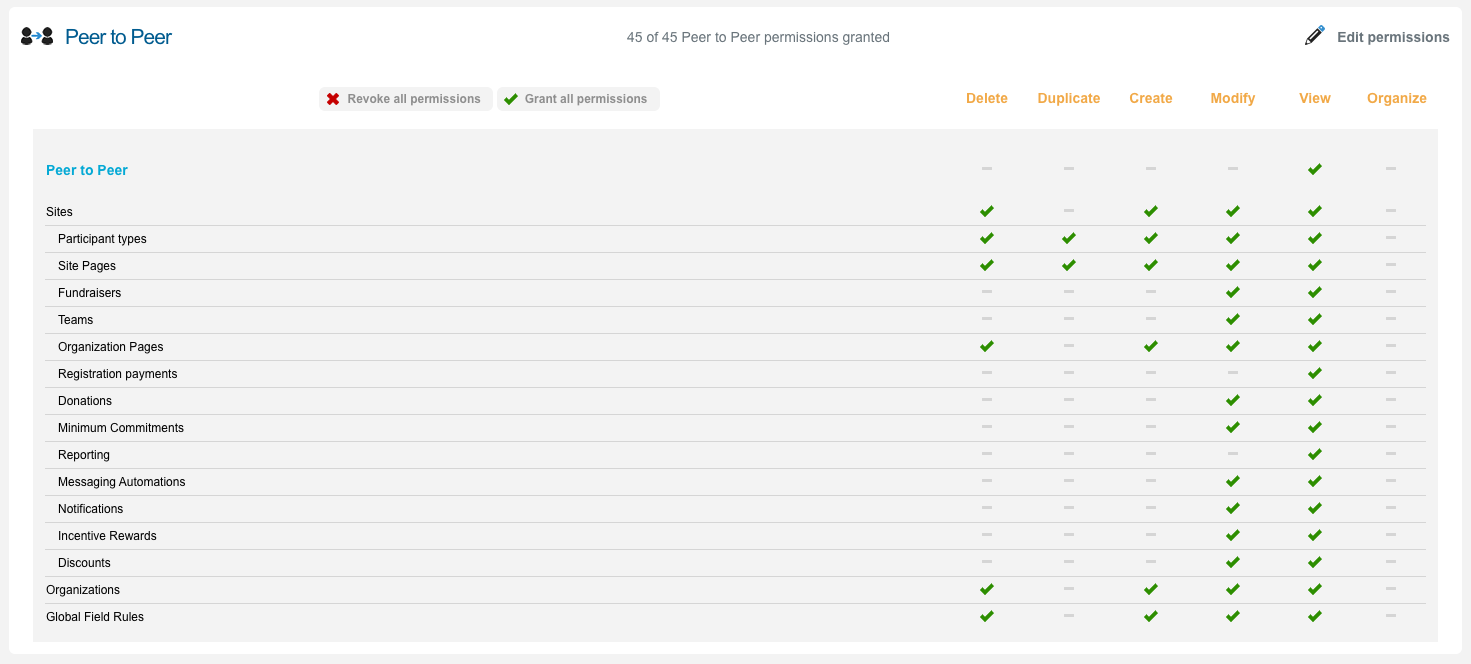
Peer-to-Peer Permissions
Administrators can now configure and fine-tune permissions for the Peer-to-Peer module, giving you full control over what each team member can see and do within your P2P sites.
-
Tailor access by role: Assign View, Create, Modify, and Delete permissions across all P2P areas including Sites, Fundraisers, Teams, Donations, Messaging Automations, Discounts, and more. Team members will only see tiles and actions relevant to their responsibilities.
-
Protect sensitive operations: Restrict who can move donations, charge minimum commitments, delete sites, or bulk-upload fundraisers — reducing the risk of accidental changes to live campaigns.
Security Note: To ensure maximum account protection, existing permission groups will not automatically inherit these new granular controls. Following the release on July 23rd, team members with 'User' roles will lose access to the Peer-to-Peer module. Super Admins must manually assign the new permissions for them to regain access.
Salesforce Connector Package 1.4 Release
We are excited to announce version 1.4 of our Salesforce Connector, which introduces a new architectural foundation required for our latest integration options as well as several key enhancements and features that will better serve our Salesforce clients. See here for full release notes and contact Support for a link to update your package.
💡Learn how to set up P2P permissions in our Academy here
Smart Pages
New feature: Fund Designations
Donors can now choose to direct their gift to a specific fund or area of need when giving on a Smart Page. To enable fund designations, simply navigate to the Page Features settings and toggle on ‘Fund Designation’. A ‘Gift Designation’ check box will now appear. Click on it to edit this feature by giving the drop-down label a name, adding the funds you’d like donors to choose from, and setting one as the default.
Account-level fund management: A new Account Settings page allows admins to create and manage a master list of funds available for the Gift Designation feature, each with a name and fund code. This data will be saved in the Direct Gift tagged field by default, but future releases will expose further customisation allowing users to map this data to a selected field.
Fund names are localizable. Designation data is persisted using the same data output format as the existing Direct Gift field (Campaign Data 20) in Page Builder.
Page-level configuration: On each Smart Page, users can enable or disable individual funds from the master list via the editing overlay.
💡 Watch and learn how to set up this new feature
Improvements
Salesforce Connector
-
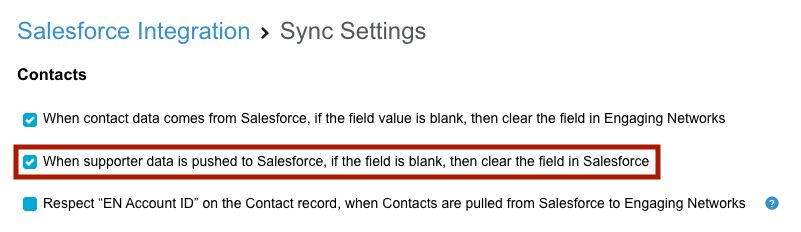
A new sync setting has been added to the Salesforce Connector that allows you to choose whether blank data pushed from Engaging Networks should clear (nullify) the corresponding field values in Salesforce. When enabled, blank supporter fields will overwrite existing Salesforce values rather than being ignored, giving you greater control over data hygiene.
-
We recently added a new field to the engaging__Matching_Rule__c object in Salesforce for "Matching Type". We updated our mapping rule interface in Engaging Networks to pull this field when we retrieve the JSON of mapping rules from the UI. Please note that package version 1.4 or later is required to pull mapping rule JSON. Contact our Support team to update your package version.
Smart Pages
-
Additional processing rules have been added to handle opt-in questions for email traffic. When a supporter who has already opted in clicks through from an email, the opt-in question is now automatically hidden on the Smart Page. This streamlines the donor experience by removing unnecessary fields when the supporter's opt-in status is already confirmed.
-
A new editing overlay has been added to the address step in Smart Pages, giving clients the ability to toggle the Address Line 2 field on or off. This allows organisations to simplify their address forms when a second address line is not needed.
-
Page performance data now displays in reporting currency as defined in your account settings. Previously, some metrics were being displayed in the original transaction currency, causing mismatches when donations were submitted in different currencies. All values and totals now convert correctly to your reporting currency for consistent and accurate performance reporting.
-
Tally View functionality can now be used to pull Smart Pages data. Learn more here.
Reporting
-
New opt-ins visual report. This report provides detailed insights into new supporter behavior, including average time to first action, donation trends, and opt-in source breakdowns, all filterable by specific opt-in questions and segments.
-
The "Total Sent" and "Total Delivered" fields in the Report Builder's Messages report now include an asterisk as a visual indicator to look below for a new clarifying note informing users that these specific metrics represent broadcast-level aggregates and are not filtered by applying a segment.
Segments
-
New Segment Data Category: New Opt-in Subscribers is now available as a filter in Segments. This allows you to identify supporters who have opted in to a selected opt-in question for the very first time within a specified date range.
-
We have improved error handling in Segments to provide context of the error being returned.
Events
-
Improved the user experience for the Events Waitlist by handling multiple clicks on double opt-in links. Supporters who have already confirmed their waitlist spot will now see a clear "You are already on the waitlist" message instead of a technical failure response.
-
The split receipt eligible amount calculation has been updated to correctly handle scenarios where a discount code is applied to an event ticket and an additional donation is made.
Gateways
-
All recurring ACH payments processed through Stripe now use the Payment Intents API, replacing the legacy Charges API. This migration is required by Stripe ahead of the Charges API deprecation and ensures continued, uninterrupted processing of recurring ACH transactions.
-
Credit card details for Blackbaud transactions can now be updated via the Supporter Hub. The ability to update card details from the Recurring Donations gadget on individual supporter records will be coming in a future release.
Marketing Tools
Upgraded Split Test Email Handling
We’ve rolled out a series of updates to our split-testing functionality. These enhancements bring greater clarity to your dashboard and give you finer control over your email campaigns.
-
You can now manually select the winning version of a split test email at any time — regardless of whether or not ‘automated winner selection’ is enabled. This is especially useful when results are inconclusive (e.g., no clicks, no conversions, or equal performance between versions) and no clear winner can be determined automatically.
-
Additionally, the split test interface now displays the approximate date and time the winning version is scheduled to send, along with the configured delay, giving you full visibility into what's happening and when.
Marketing Automation
-
The ‘Custom Date’ automation now allows users to specify the date format (YYYY-MM-DD or YYYYMMDD) for their custom fields. This provides greater flexibility for clients with varying data storage standards.
Abandonment
Following last month’s initial release, we are continuing to create a more robust set of features within the form abandonment tool.
Expanded exclusion settings
You can now define additional exclusion criteria to control which supporters receive form abandonment reminder emails. This gives you more control to prevent unnecessary or unwanted reminders from being sent. The new exclusion options are:
-
Recent donors — Suppress reminders for supporters who have completed a donation within a specified number of days
-
Active recurring donors — Toggle to exclude supporters with active recurring donations
-
Major donors — Toggle to exclude supporters flagged as major donors. (please note: major donors segment will refresh weekly, but it can also be manually refreshed if needed)
-
Email domain exclusion — Specify internal or other email domains to exclude (useful for keeping internal traffic out of abandonment reporting)
Exclusion criteria are checked before each abandonment email is sent. Supporters matching any enabled exclusion rule will not receive the reminder.
💡 Updated Academy training that includes these new settings can be found here
Page Builder improvements
-
Status Alert for Abandonment Reminders: We've added a warning callout to the email reminder edit overlay. If abandonment reminders are currently disabled at the account level, you'll see a clear alert letting you know before you start editing.
Smart Pages improvements
-
We have added additional customisation to abandonment email reminders in Smart Pages allowing users to update the reminder delay window at the page level.
-
Page level reporting has been updated to include form abandonment data.
Supporter Hub
-
We've added additional in-browser protection to prevent duplicate submissions in the Supporter Hub's Update Recurring Donation gadget, ensuring that only one update request is processed regardless of how many times the update button is clicked.
Export
-
QMR transactions now include the associated campaign name (the page where the question was submitted). This value is written to the Campaign Data 32 field, which was previously blank on QMR rows.
Peer-to-Peer
-
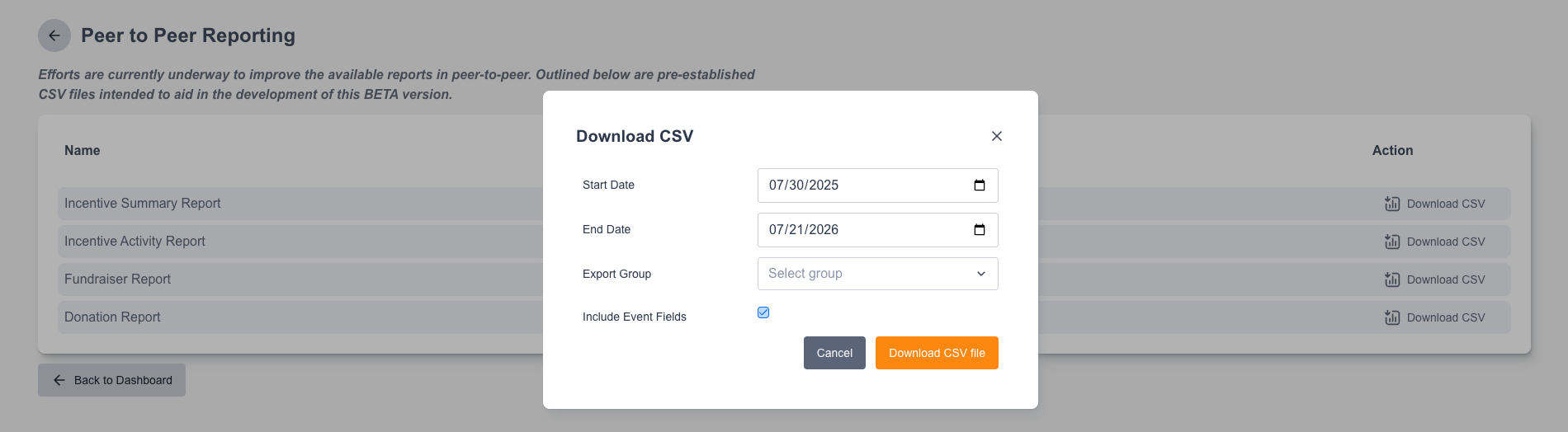
The Fundraiser Report and Donation Report CSV downloads now pre-populate start and end date fields with the maximum available historical range, eliminating the need for manual date entry. The Donation Report enforces a 2-year date range limit to protect database performance, automatically defaulting to the most recent two years for older sites and displaying a validation error if a user manually exceeds the limit.
-
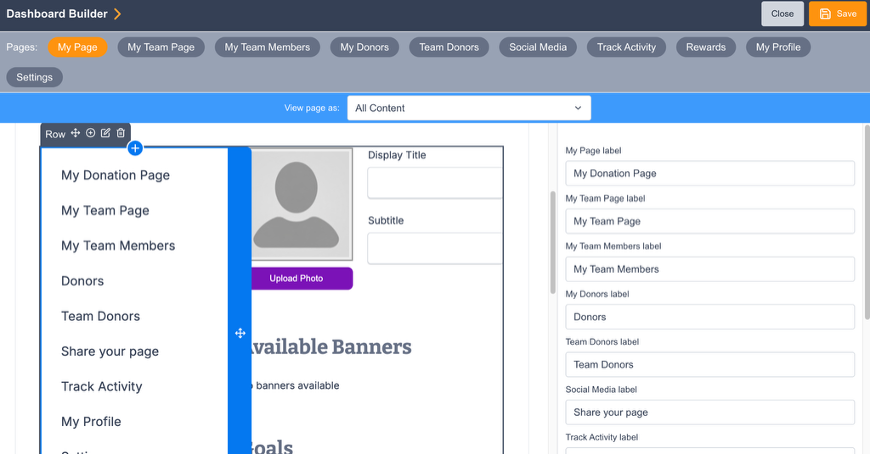
Fundraiser Dashboard menu labels are now editable. Administrators can customize the navigation labels displayed on the fundraiser dashboard by clicking on the menu block and customizing the options shown.
-
We added a new "Inactive Peer-to-Peer Donation Page" alert. When a supporter follows a direct donation link to an archived fundraiser page, the system now displays a clear alert instead of allowing the transaction to proceed, preventing gifts from being made to archived campaigns.
Bug Fixes
Smart Pages
-
There was an issue where the user wasn't able to delete a suggested amount from the list if the impact statement was enabled. This has been fixed.
-
There was an issue with the correct display of dropdown fields in some versions of Safari. This has been fixed.
-
Some of the fields weren’t showing correct accessibility content. This has been fixed.
-
Fixed an issue where the frequency merge tag in autoresponders inserted data in all-caps.
-
Upsell usage and conversion data wasn't populating data correctly. This has been fixed.
Marketing Tools
-
There was an issue with pulling the latest default block content when building broadcast messages from an updated template. This has been resolved.
-
Fixed an issue where a prescheduled broadcast message segment identifying 0 supporters at the time of send would display a perpetual "Reporting is still being generated" status. The reporting page now displays a clear message indicating the broadcast was not sent to any supporters.
Rest API
-
The ENS REST API supporter query endpoint was returning fewer supporters than expected. This was fixed.
Page Builder
-
Fixed an issue where supporter address details provided via Apple Pay or Google Pay were not being saved to the supporter record when the corresponding address fields existed on the donation page but were left empty.
Peer-to-Peer
-
Fixed an issue where the statistics columns for multiple fundraising pages on the Fundraiser Management screen were incorrectly affected by search filters.
-
Fixed an issue where logging into a newly created fundraiser page could incorrectly reactivate archived fundraiser pages registered under the same email. Archived pages now remain archived regardless of login activity on other pages, keeping Fundraiser Management and the supporter’s My Pages screen in sync.
-
Fixed an issue where returning unpaid registrants were not immediately shown a sold-out message on the checkout page when their participation type had reached capacity. The page now correctly displays the sold-out alert on load, preventing supporters from filling out a payment form they cannot complete.
-
The "Save" button on the Fundraiser Dashboard is now reachable via keyboard Tab navigation, ensuring keyboard-only users can save their changes without requiring a mouse.
-
Resolved a bug where a paid team member registered alongside a team captain in the multi-registration flow remained marked as "Unpaid" despite a successful combined checkout payment.
-
Resolved a bug where moving an individual fundraiser to a new team and assigning them as captain through the admin Fundraiser Management area did not correctly set their captain role. The fundraiser was incorrectly marked as a "Team member," leaving the team without a captain and causing errors when attempting to promote members or when new participants tried to join the team.
-
Resolved an issue where a custom URL Slug on a Peer-to-Peer site caused direct registration links not to work.
-
On sites with over 1,000 donations, some leaderboard results were not matching with actual totals. We fixed the leaderboard query that retrieves these totals to avoid hitting this limit.
July 2026
This release was deployed on Monday, July 7th at 3pm ET.
Salesforce Connector Release Notes - Version 1.4
We are excited to announce version 1.4 of our Salesforce Connector, which introduces a new architectural foundation required for our latest integration options as well as several key enhancements and features that will better serve our Salesforce clients.
Key New Features
Enterprise Salesforce Connector
Our newly released Enterprise Salesforce Connector allows for high-frequency transaction data syncing between Engaging Networks and Salesforce. Unlike the standard nightly sync, this feature pushes and processes transactions approximately every 20 minutes. On the Salesforce package side, we have made several major enhancements to provide the option to process staging records in near real-time when using the enterprise EN feature.
Several steps are required in order to enable this real-time processing in the Salesforce package. For more information and to find setup steps, view the Supportal article here. Reach out to your Account Success Manager if you are interested in enabling the Enterprise Salesforce Connector on your service plan.
This feature requires Salesforce Connector package 1.4 or later and to update your service contract with Engaging Networks to pay for the more frequent sync. Reach out to your Account Success Manager for more information.
Kindsight Ascend Integration
Engaging Networks now offers a specialized integration path for organizations using Kindsight Ascend. As an enterprise-grade fundraising CRM built on the Salesforce platform, Ascend requires a specific data flow to ensure your constituent and gift data are processed accurately through its unique architecture.
This integration utilizes a modified version of our standard Salesforce Connector, designed to work with Ascend’s Interims and RTv2 objects to ensure data is cleaned and deduped before it enters your database of record. By enabling "Sync Extended Supporter Details" in your sync settings, (requires package 1.4 or later) supporter biographical data is bundled into the Transaction Sync, allowing for accurate routing into Ascend’s specialized objects.
Implementation requires upgrading to the latest Salesforce Connector package and importing the provided Ascend-specific mapping rules, among other setup steps. For detailed technical specifications, activation requirements, or assistance with your implementation, please review this Supportal article or contact our Support team.
This feature requires Salesforce Connector package 1.4 or later.
Support for Person Accounts (Nonprofit Cloud)
Functionality has been added to support syncing Contacts into environments using Nonprofit Cloud (NPC) and Person Accounts.
Previously, on the duplicate check from Engaging Networks to Salesforce when syncing a new supporter, when a Person Account was matched, the endpoint defaulted to returning the Account ID instead of the required Contact ID.
Updated Logic: The system will now correctly return the Contact ID and write it back to the supporter record when a Person Account is found.
Additionally, we have ensured that merges on Person Account records are now properly reflected in Engaging Networks when using the “Reflect merges” setting in your sync.
Contact Top Up Rule - Duplicate Check
A new option on the Matching Rule object allows the matching process to use existing Salesforce duplicate rules instead of the static logic defined per rule. To enable this, set the Matching Type to "Duplicate Rules” inside of the Contact Top Up’s matching rule to utilize your native Salesforce deduplication logic. This “Duplicate Rules” setting is now also available for other mapping rules if you find there are other matching scenarios it would help address.
Recommended Optimizations for Contact Top Up Rule
Given the additional options on the Contact Top Up rule, we would recommend implementing the following enhancements to your existing rule to take advantage of the new features. Update your Contact Top Up mapping rule after installing the latest package:
-
Enable Duplicate Rules: In the Contact Top Up Matching Rules, update the Matching Type to Duplicate Rules to utilize your native Salesforce deduplication logic.
-
Sync Extended Supporter Details: To create fuller contact records from this rule, enable “Sync Extended Supporter Details” under Sync Settings in Engaging Networks (requires package 1.4 or later), then map your preferred biographical fields under Mapping Items.
-
Prevent Unintended Syncs: Add a mapping item to set EN Push = TRUE. This signals to your flow rules that the update originated from Engaging Networks, preventing data from being incorrectly queued for sync back to EN and protecting your existing opt-in data.
Bug Fixes and Performance Updates
-
Mapping Rule “Save & Close” error: The "'Page doesn't exist' error on mapping rule save and close" has been resolved.
-
Merge Audits tab: There is now a Merge Audits tab available in the EN Connector App to make it easier to track merges that should reflect in Engaging Networks.
-
Supporter data fields added to ENSR: Additional supporter data fields have been added to ENSR records to house data that flows when “Sync extended supporter details” is enabled in Engaging Networks. This is primarily to support the Kindsight Ascend version of the integration. See the Supportal article here.
-
Transaction Date/Time conversion issue: Previously, an issue caused the Transaction Date/Time field to double-convert timezones, resulting in the wrong time being displayed on ENSR records. This package introduces a fix:
-
A new field, Transaction_Date_Time_v2__c, now captures the correct date/time via a trigger when a record is created or updated.
-
The existing Transaction Date/Time field has been updated to reference this new correct value.
-
Action Required: If your organization implemented local workarounds (e.g., custom formulas or automation) to correct the previously incorrect Transaction Date/Time field, you must now remove these local fixes, as the field now contains the correct value by default.
-
Note: This change only affects new or updated ENSR records and will not fix existing records.
-
How to Update your Package
Contact Engaging Networks Support to get the link to update your current package version.
Note: While updating to the latest Salesforce package is not required to maintain your core data sync, we highly recommend it. Updating ensures full feature compatibility and access to recent fixes.
June 2026 - 6.3.1
Hotfix was deployed on Wednesday, June 24th at 3pm ET.
Bug Fixes
Page builder
-
There was an issue in abandonment reminder emails where a base default domain was used instead of a custom page url causing errors when clicking through the link. This has been resolved.
June 2026 - 6.3.0
This release was deployed on Thursday, June 11th at 3pm ET.
Notable Updates
Form Abandonment
Pages can now automatically send a personalized reminder email to donors who abandon the donation process, encouraging them to return and complete their gift. This new feature is available for Smart Pages, as well as the following Page Builder page types: Donation, Premium Donation, Symbolic Giving, Membership, and Peer-to-Peer Checkout and Donation.
Key capabilities:
-
A master on/off toggle in Account Settings controls whether form abandonment reminder emails are sent. When disabled, no abandonment emails will be sent from any page, regardless of individual page-level settings. When enabled, emails are sent based on each page's own configuration.
-
Unsubscribe link – Supporters can unsubscribe from receiving abandonment reminder emails. The unsubscribe link in all abandonment emails will automatically connect to the default opt-in question and confirmation landing page defined in Account Settings.
-
Customisable email content – Edit the subject line, body copy, images, and sender using the built-in email editor.
-
Merge tag support – Personalise emails with supporter data (e.g. first name) and page URL.
-
Resume link – Insert a "Complete Your Donation" button that links supporters directly back to the form they abandoned, so they can pick up where they left off.
Only available for Page Builder pages with this release:
-
Customisable delay - Edit how many hours to wait before sending a reminder email to donors.
-
Abandonment Performance: Additional reporting is available at the page level for form abandonment, giving clients visibility into the performance of their abandonment recovery emails. The report is accessible via Quick Reports and includes the following metrics:
-
Abandoned Events – Number of sessions where a supporter started the form but did not complete it
-
Recovery Emails Sent – Number of follow-up emails sent to supporters who abandoned
-
Recovered Gifts – Number of donations completed via a recovery email link
-
Recovery Rate – Percentage of recovery emails that resulted in a completed donation
-
Recovered Revenue – Total value recovered from donations completed through recovery email links, including both single and recurring transactions This enables clients to measure the ROI of their form abandonment recovery strategy directly within the platform.
-
Where to find it:
-
In Page Builder, open the right hand navigation bar and click on Form abandonment. You’ll see a new Abandonment Reminder Email is now available as an option.
-
In Smart Pages, navigate into your page and click into the Page Settings. From there, click into Page Features where you can toggle the Email Reminder on. Once saved, you’ll see a new Abandonment Reminder option when you click on Emails.
Peer-to-Peer: Multiple Fundraising Pages
We are excited to introduce Multiple Fundraising Pages, a highly requested update to our Peer-to-Peer platform. This feature allows a single supporter to create and manage multiple independent fundraising pages within a single site using the same email address.
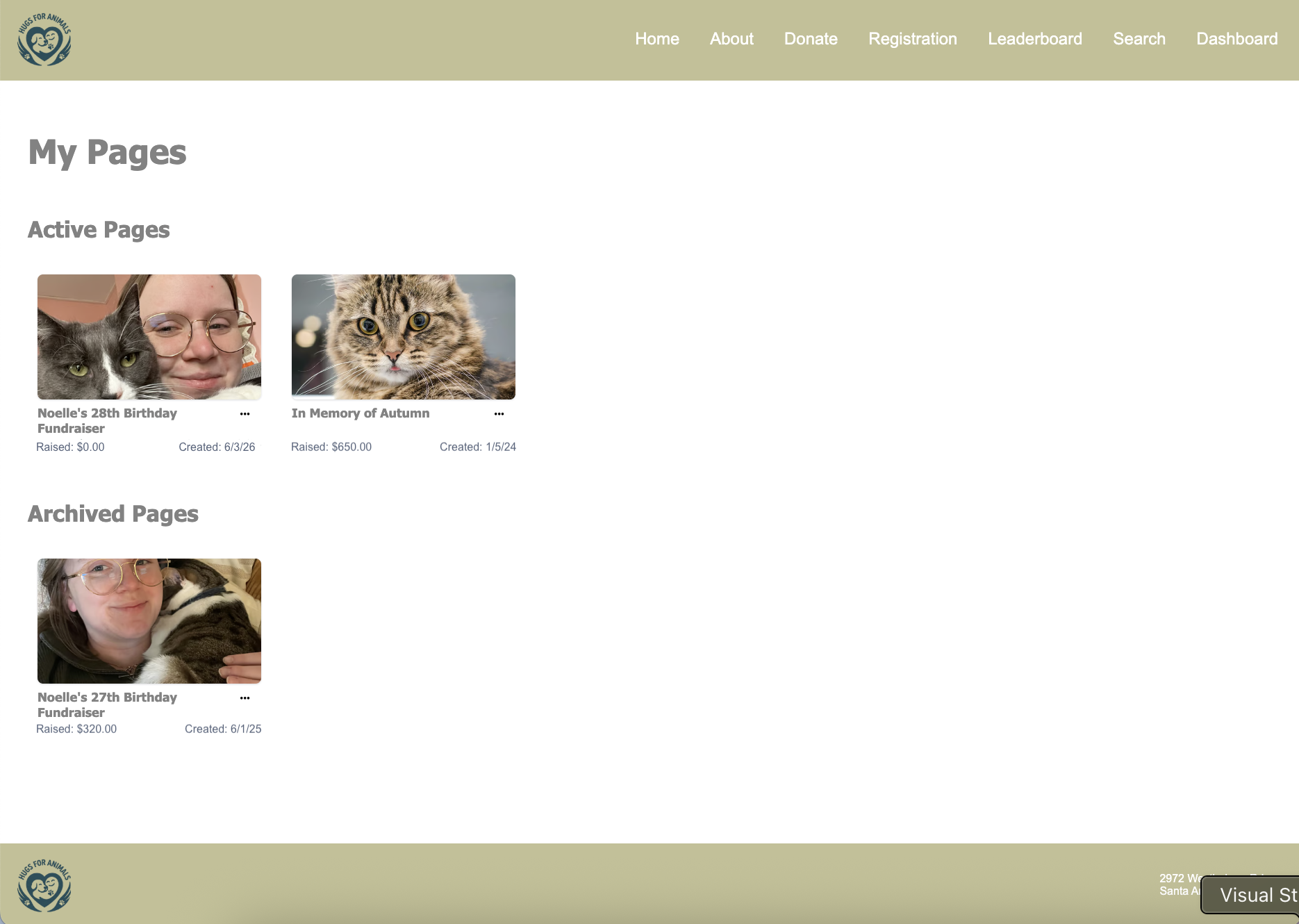
Why this matters:
Previously, supporters were limited to one fundraising page per site. This update unlocks several key use cases, including:
-
Recurring fundraising campaigns: Supporters can run annual birthday or tribute fundraisers year-over-year without losing historical data.
-
Concurrent efforts: A fundraiser can launch a new campaign (e.g., a memorial fund) while keeping an existing general fundraiser active.
-
Improved retention: Supporters no longer need to use multiple email addresses to start something new.
Key Features
-
Fundraiser Dashboard Selection Screen: When enabled, upon logging in, supporters will see a new selection screen. This "hub" displays active and past campaigns as tiles, showing the page image, title, and amount raised.
-
Campaign archiving: To keep dashboards organized, supporters and admins can now move pages to an Archived status. Archived pages remain in the system for reporting and historical totals but are separated from active campaigns on the supporter’s dashboard.
-
Granular reporting: We have added additional reporting tools to help you measure the impact that Multiple Fundraising Pages is having on your fundraising program.
How to enable
This feature is optional and can be enabled on a site-by-site basis.
-
Navigate to Site Settings > Fundraising Options.
-
Toggle on “Enable multiple fundraising pages.”
-
Once enabled, a new system page, “Multiple Fundraiser Dashboard Selection,” will be available under Site Pages for you to customize labels, headings, and introductory copy.
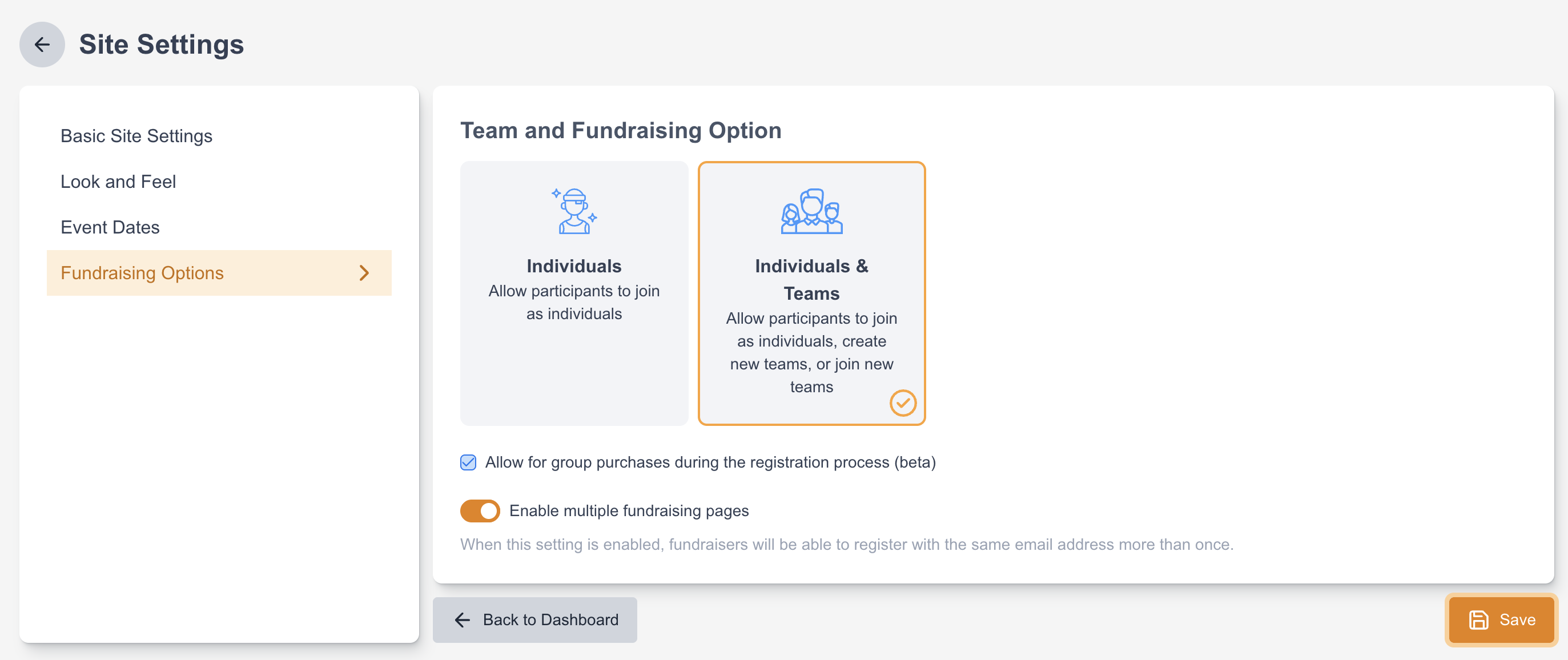
Note: This setting can be applied to both new and existing P2P sites (DIY and Events), allowing you to bring this functionality to your long-standing campaigns immediately.
Improvements
Marketing Tools
-
When sending a test broadcast, you were previously limited to 11 saved ‘Previous Test Recipients’. We have increased the saved test recipient limit to 15 and added a delete icon for easy list management. Additionally, the list will now automatically be sorted by most recently used, ensuring your most frequent testers stay at the top across all broadcasts.
-
Text editor improvements, meant to provide clients with greater flexibility when formatting email content:
-
A new font dropdown on the toolbar now offers a selection of web-safe fonts that can be applied to individual text selections without affecting the rest of the block.
-
We have added more granular text size formatting options. Users can now select pixel-based text sizes from an expanded dropdown list.
-
Smart Pages
Improvements
-
Share on X: Smart Pages now supports social sharing to X (formerly Twitter), allowing donors to share a page directly from the confirmation screen after completing their action.
-
Phone number field update: The phone number field on Smart Pages donation forms now includes automatic country code formatting, making it easier for donors to enter their phone number correctly.
-
Improvements made to the visual consistency of form fields on Smart Pages:
-
We have adjusted the style of dropdown fields, preventing text from being cut off when larger font sizes are used.
-
Placeholder text size now matches the entered input text size, and placeholder colour has been softened (#667085) for better visual hierarchy.
-
The error message border radius is now consistent with the form field border radius, including payment failure alerts.
-
Payment block fields now correctly reflect the page's configured font size.
-
-
The Smart Pages lightbox can now be configured to open automatically when a visitor lands on your website, in addition to the existing manual trigger via button click. To configure the lightbox to open on page load, add the data-sp-page attribute directly to the embed script tag.
-
We have made further updates to the recurring gift callout feature to improve the way we handle callout text and arrow display for various frequency settings. The callout will now automatically disappear if a recurring gift is selected.
-
Automated Country Detection: We have improved default value mapping on Smart Pages forms. The country field now automatically detects and populates using the supporter's location data, creating a smoother, more efficient address-entry process
-
Improved screen reader support across Smart Pages to ensure a more accessible donation experience:
-
Aria labels were added to the ‘previous step’ button used to navigate between donation flow steps.
-
Form validation errors are now announced to screen readers, so users are informed when a field needs attention.
-
Navigating between steps now triggers a step header announcement (e.g., "Your address"), keeping screen reader users oriented within the multi-step flow.
-
SMS
-
SMS Inbox messages are now available through the Bulk Export API. This enables sync using our Salesforce Connector to Salesforce
Fundraising
-
A new 'Recurring Gifts' page under the Data & Reports section has been added to provide a dedicated interface for managing and searching for recurring transactions. On this page, you can select multiple recurring transactions and perform a bulk edit.
Report Builder
-
Untagged custom supporter fields are now available in Report Builder Transaction reports.
Peer-to-Peer
-
We have added the ability to set a default value for Select Lists within the Peer-to-Peer (P2P) registration. This improvement allows administrators to pre-fill common choices (such as a default country), saving your supporters extra clicks and reducing friction during the registration process.
-
We have added a new "Public Team" block to the My Team Page within the Fundraiser Dashboard, allowing Team Captains to update their team's privacy settings at any time after registration. Additionally, team privacy is now fully decoupled from individual captain privacy. Team Captains can now mark their personal fundraising pages as private (hiding them from searches and leaderboards) while keeping their team page public, or vice versa. For new Peer-to-Peer sites, this block will be included automatically; for existing sites, administrators can easily add it from the component library.
-
Previously, when a registration type on a Peer-to-Peer site was paid and had a maximum capacity set, we would decrement the number of available tickets before payment was actually completed. This led to abandoned registrations tying up ticket inventory, requiring admins to introduce workarounds to keep track of true remaining slots. The system now waits for a successful payment response before decrementing the remaining inventory for paid participation types. An additional inventory verification step has also been introduced immediately prior to transaction processing to safeguard against tickets selling out while a user is on the checkout page.
-
Our new Form Abandonment functionality can be used on Peer-to-Peer Checkout and Donation pages! To get started, navigate to Pages > Settings > Abandonment to set your global abandonment rules, then configure abandonment emails on your individual Peer-to-Peer Checkout and Donation pages.
Bug Fixes
Marketing Automations
-
When a Custom Date EMA was set to send an email 1 day before the date in the custom field, it was instead pulling the supporter into the journey on the date in the custom field. This was fixed.
-
Links sent via Marketing Automation SMS messages will now correctly shorten using your account's custom subdomains rather than standard system URLs. This aligns the feature with the behavior of the Broadcasts tool.
Security
-
Previously, it was possible for non-Super Admin users to access the Content Security Policy link when using a direct link. This was resolved to properly enforce Super Admin permissions for accessing the Security Center.
-
Previously, when a single user (email address) was shared between multiple accounts on the same data center, after setting up 2FA and logging out of one of the accounts you would get stuck on a blank login screen. This has been resolved.
-
Previously, the 2FA setup screen indicated that only Google Authenticator could be used for 2FA with Engaging Networks. This messaging has been updated to reflect that any authenticator app of choice can be used.
Smart Pages
-
There was an issue where the "Insert supporter data" tool in Smart Pages emails was inserting incorrect merge tag syntax . This caused supporter data to not populate in sent emails. This has been fixed.
-
When sharing a Smart Pages link on LinkedIn, the link preview now includes a page description alongside the image. Previously, only the image was displayed in the preview with no accompanying text.
-
On some pages, there was an issue with updating default gift amounts. This has been fixed.
-
Previously, when a donation form was configured with only a single giving frequency (e.g., one-time only), the frequency selection button was still visible to donors on the page. This button has now been removed to avoid confusion, as there was no alternative frequency to choose from.
-
There was an issue adding custom slugs in some client accounts. This has been resolved.
-
The Stripe payment element previously displayed messaging about future charges on the donor's card even when a one-time (single) gift was selected, which could cause confusion for donors. This has been resolved.
Gateway
-
Implemented additional checks for the Stripe gateway for enhanced security.
Supporter Hub
-
We have resolved a bug that caused the final page of a supporter's Giving History to show as blank in the Supporter Hub.
Peer-to-Peer
-
We have resolved a bug that prevented the creation of fundraising pages when the Organization selection contained an apostrophe.
-
We have resolved a bug that prevented the use of the bulk fundraiser import feature if only individual fundraising was enabled.
-
Previously, duplicating a Peer-to-Peer site would not carry over the waiver and required an additional step to re-save the waiver settings before it would appear on the new site. This has been fixed so the waiver properly copies over when duplicating a Peer-to-Peer site.
-
Previously, when a non-numeric value was used in the direct gift field on a Peer-to-Peer form (which is where additional donation value is housed), clients would receive errors when trying to access their list of fundraisers or donations. We have adjusted these queries to avoid this error in these situations.
-
Previously, when a site was set to exclude registration fees from site totals, refunded registration transactions (PPAY) produced negative Amount Raised values on fundraiser and team records. This has been fixed.
-
Previously, if a fundraiser login link was sent before a fundraiser was blocked, that fundraiser could use the existing link to access their Peer-to-Peer dashboard. This has been fixed so that blocked fundraisers cannot login using an old login link.
Legacy Peer-to-Peer Maintenance
Our Legacy Peer-to-Peer tool deploys on a schedule separate from the rest of Engaging Networks. Maintenance updates will be included here in Release Notes and will include the date of the update.
-
Released on July 2, 2026: Our legacy P2P tool previously allowed fundraisers to send authenticated outbound emails from Engaging Networks’ servers. To protect our platform, our customers and their critical email domain reputation, we have disabled all fundraiser email-sending tools across all legacy P2P sites. The configuration options to re-enable this feature have also been removed. The ability for fundraisers to send thank-you messages to their donors is still available through the fundraiser dashboard.
April 2026 - 6.2.0
This release was deployed on Thursday, April 30th at 3pm ET.
Notable Updates
SMS Inbox Manager
This upgrade to our existing SMS module allows clients to review and respond to supporter replies generated from outbound SMS campaigns. Use the inbox feature to streamline supporter interactions, engage in real-time, and provide exceptional supporter care services.
Key capabilities:
-
See a list of supporters who have sent inbound SMS replies, along with their name, number, last message, and timestamp.
-
Open any supporter to view a full conversation history, including inbound supporter messages and outbound replies from your team.
-
From a conversation, quickly view supporter details (contact info, giving history, last action, etc.) and easily jump to their full profile.
-
Easily action unsubscribes with the built-in opt-out feature.
More information can be found on the Supportal here.
https://www.youtube.com/watch?v=45gTxXvh5bI
2FA Security Enhancement
Users with 2FA enabled will now be required to enter a two-factor authentication (2FA) code on every login attempt. Users with 2FA disabled will continue to login as normal.
Regulations.gov
We’re introducing a new integration to enable clients to continue running regulatory advocacy campaigns to Regulations.gov. We have updated the documentation on the Supportal with the steps you need to take to use this new integration.
Smart Pages
Following the official launch of Smart Pages earlier this month, we have continued to refine the user interface and address initial feedback. We have also enhanced backend logic for smoother page processing, as well as made improvements to the client and donor experience.
In this release, we are also excited to bring you the first wave of additional features offering you more tools to build great donation pages.
Key updates:
New “impact text” for Suggested Gift Amounts: For both one‑time and recurring gifts, you can configure custom impact statements for each suggested amount, helping supporters understand what their donation can achieve.
Fundraising Progress Bar: Add a visual to your Smart Page showing how close a campaign is to its goal, motivating supporters to give larger or additional gifts.
Recurring Gift Nudge: Add a recurring gift nudge to draw donors’ attention to the monthly/recurring option and encourage more sustainable giving.
Link to Campaign: Page Builder campaigns can now be chained to a Smart Page. Send your supporters from an existing Page Builder campaign straight to a Smart Page while carrying their data across to prepopulate fields.
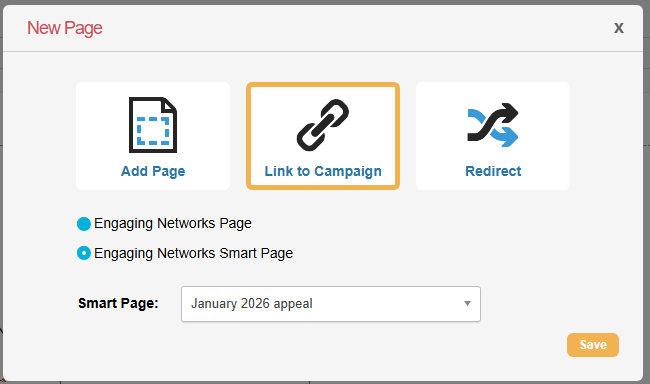
Opt-In Creation: Create new opt‑ins directly within the Smart Page settings page, making it easier to configure consent preferences in one place.
.png?cb=aad64a685a9bb565b4a1ae55154558f5)
Icon tooltips: Clear tooltips have been added to key icons on list and edit screens, making it easier to understand what each action does.
Add PayPal Account: Easily add a PayPal One Touch gateway directly from the Payment Setup screen in global Settings, without leaving the Smart Pages area.Improvements
.png?cb=f098345f3a7eb21f26e93a99a868bd2c)
Improvements
Billing
-
We have updated our invoicing integration to support NetSuite as our new billing platform. This change is part of the migration away from Sage, and clients will continue to access invoices via the EN Client Dashboard as usual, but invoices will now originate from NetSuite instead of Sage. To view an example of the new invoice format, visit the resources area of our Trust Center here.
Marketing Tools
-
We have disabled Send Time Optimization for emails using Split Testing. This prevents scheduling conflicts where optimization delays could cause the winning version to be sent later than intended.
Payment Gateways
-
Support for Stripe Pre‑Authorized Debit (PAD) in Canada: We’ve added support for Stripe’s Canadian Pre‑Authorized Debit (PAD) payments, enabling clients to process bank transfers for Canadian supporters directly via Engaging Networks, similar to ACH in the US. Previously, Engaging Networks only supported importing PAD transactions for processing.
-
The IATS payment integration has been updated to use a newer IATS API endpoint (v4) that supports the comment field. This restores the ability to send a clear description for new recurring credit card schedules so reporting in IATS matches previous behavior.
-
Venmo and PayPal One Touch transactions with a status of ‘Pending’ for more than 7 days will now be automatically updated to a status of ‘Reject’. This automated cleanup is to address the issue of abandoned transactions.
-
Implemented additional server-side validation for Stripe payments for enhanced security.
Peer-to-Peer
-
A new setting for the Team/Individual Search Block allows Peer-to-Peer sites to display an alphabetical list of public fundraisers by default before any search terms are entered. To ensure site performance and protect against automated bot crawling, results are paginated with a hard limit of 20 per page and a total cap of 2,500 results.
-
We have added logic such that registration fees are only reported as "paid" once the gateway transaction is successfully completed, specifically improving handling for Stripe 3DS and other pending payment states. Additionally, we have updated the Peer-to-Peer payment logic to ensure transactions are accurately recorded as PPAY, PACS, or PFCS regardless of their initial status, preventing them from default-categorizing as FCS when the status is something other than "success".
Bug Fixes
SMS
-
Previously, if multiple supporter records shared the same phone number and were included in a broadcast query, they would receive duplicate messages during bulk sends. We have updated the broadcast logic to identify and skip duplicate phone numbers, ensuring supporters receive only one message regardless of how many records they have that are included in the SMS audience.
Page Builder
-
The “prioritize reference data over utm data” donation page option wasn’t working correctly. This was fixed.
Smart Pages
-
We’ve fixed an issue where in some cases Smart Pages lightboxes embedded on a website page could be partially hidden at the top of the screen.
-
Fixed an issue where Smart Pages could not be saved for accounts using certain default locales
-
We have disabled the Link payment option which was being added to the page automatically if enabled in the Stripe account.
Events
-
We have added back the ability to mark Event transactions as refunded. Both this option and the option to refund through the gateway are available on Event transactions.
-
Fixed a permissions issue that prevented authorized users from seeing the event waitlist option.
-
Bug: We fixed an issue where supporters attempting to join the waitlist from a duplicated Event page would see the error message: “Failed joining waitlist. Please try again later.”
Supporter Hub
-
Only active sustaining pledges will now show for ROI transactions
Peer-to-Peer
-
Previously, if digital wallets were used on a checkout page missing the Direct Gift field, the checkout page incorrectly combined registration fees and additional donations into a single PPAY record. This has been fixed so that when digital wallets are used on a paid registration with an additional donation, PPAY and PACS transactions are properly split into separate transaction rows.
-
Previously, if a supporter opened another Engaging Networks tab while on a Peer-to-Peer checkout or donation page, or remained on the page for an extended period of time, the active session could be lost. This occasionally resulted in transactions being incorrectly recorded as FCS (instead of PPAY or PFCS, respectively). We have implemented a fix to ensure that Peer-to-Peer registration and donation sessions remain intact, even if session interruption occurs.
April 2026 - 6.1.2
Smart Pages: Official Release!
We are thrilled to announce the arrival of Smart Pages, your new streamlined option for rapidly building a beautifully designed and effective fundraising page. Launch in minutes — no custom development work required.
Choose from two fully mobile-optimized and accessible templates, then personalize your page to match your organization’s brand, and easily add industry-tested features that drive conversions like a recurring gift upsell, playful monthly giving animations (think floating hearts or a burst of stars), fee cover, gift dedication, and easy social sharing tools.
Your page will be automatically populated with the necessary form fields, saving valuable time. And each page comes with embed code you can use to create an action lightbox for your website.
Smart Pages utilizes the Stripe payment gateway (alongside Paypal) and is free for any client who already has the license for our Fundraising module. If you’d like to add the Fundraising module, please speak to your Account Success Manager. If you don’t have a Stripe account, you can use a default Engaging Networks test Stripe gateway to test out this new module for your organization. Learn more and get started here.
Looking Ahead
The Smart Pages roadmap is packed with additional features, including AI-powered smart ask amounts and upsell recommendations, cart abandonment, additional templates, language conversion based on browser preferences, e-cards, matching gifts, progress bars, and more
Bug Fixes
Hotfix was deployed on Thursday, April 9th at 3pm ET.
Events
-
In our last release we made changes to how refunds for offline/cash donations work which resulted in free event tickets being unable to be refunded. This has been fixed so you can now once again refund free event tickets.
Peer-to-Peer
-
Profile queries using the Peer-to-Peer participant type filter could fail when a participant type name contained an apostrophe. This was fixed.
Legacy Peer-to-Peer Maintenance
Our Legacy Peer-to-Peer tool deploys on a schedule separate from the rest of Engaging Networks. Maintenance updates will be included here in Release Notes and will include the date of the update.
-
Released on April 9th, 2026: Due to spam and fraud protections in place on Legacy Peer-to-Peer, previously copyright, registered trademark, and trademark symbols present in Fundraiser stories were preventing them from saving. We have adapted these filters to allow for these specific symbols.
April 2026 - 6.1.1
Hotfix was deployed on Thursday, April 2nd at 3pm ET.
Bug Fixes
Event Waitlist
-
There was an issue with the Event Waitlist capability where when the Manage Waitlist permission was disabled, users were getting Access Denied to access or edit Event pages. This issue has been resolved.
-
There was an issue with Email Addresses in Manage Senders for Event Waitlist Autoresponders as it was loading Broadcast Email senders instead of Thank You Email senders.
Peer-to-Peer
-
There was previously an issue where registrants who used a 100% discount code on Peer-to-Peer sites did not receive the New Registration or New Team Registration emails. This has been fixed.
March 2026 - 6.1.0
This release was deployed on Thursday, March 26th at 3pm ET.
Coming Soon
Development work continues on Smart Pages – our next major initiative. This exciting addition to the form-building experience in Engaging Networks is planned for release on April 9th. We are busy putting the final touches on the features that will be offered in Phase 1 of Smart Pages and performing thorough testing. If you missed the roadmap session from January, you can check it out here for a sneak-peek at Smart Pages.
Notable Updates
Event Waitlist
Introducing: event waitlist capability! You can now allow your supporters to join a waitlist once an event reaches capacity and be offered available spots if they open up. This feature helps organizations maximize event attendance, reduce manual list management, and provide a smoother registration experience when events are sold out.
Salesforce DigiCert Global Root G2 certificate transition
You may have seen notices that Salesforce is updating its digital certificate infrastructure and that this specific transition requires customer preparation to ensure continued connectivity.
We have confirmed that the required root certificate is already included in our system's trust stores and no impact to service is expected.
Improvements
Salesforce
-
We are adding additional fields to the Salesforce Connector Contact Mapping that will allow you to pull information from Salesforce and place it into Timezone Offset, Most Recent Contribution, Highest Previous Contribution, and Longitude and Latitude fields in Engaging Networks.
Report Builder
-
New "Supporter Report" template now available for the custom report builder. With this report, you can quickly and easily get a full picture of your supporters. The report template pulls together all of the relevant fields for you, so you just need to select your Segment (or choose ‘All Supporters) and follow the steps to download the report. You can also customize the report by removing any fields you don’t need or adding additional fields that are not included in the template.
Page Builder
-
A page-level option to record reference data (en_txn) over utm data when both are present in a donation page URL has been added. To enable this feature, navigate to the Page Settings screen and tick the box under Campaign References.
-
We have updated the Conditional Content interface within Page Builder to provide better control over profile-specific content and prevent the "All Supporters" version from unintentionally overwriting your work.
-
Filtered Dropdown Menu: The conditional content dropdown menu within a content block now only displays profiles that have been specifically enabled for that block. This eliminates confusion regarding which profiles are currently active or being edited.
-
New "Manage Profiles" Action: To add a new profile variant to a block, users now click a Pencil/Edit icon. This opens a management interface where you can explicitly select which profiles should have unique content for that specific component.
-
Consistent Experience: This workflow now more closely mirrors how conditional content is handled in the Email Messaging module, providing a more unified experience across the platform.
-
Gateway
-
Stripe: Migrated ACH skip verification payments from Stripe Charges API to Payment Intents API to comply with upcoming deprecation.
-
Paysafe: Initial Paysafe ACH/EFT transactions will now be marked as ‘Pending’ until the transaction is confirmed as successful or not. At that point, the status will update to ‘Success’ or ‘Reject’. This ensures that supporters are not issued a receipt for transactions that are ultimately rejected. If you accept ACH/EFT payments via Paysafe and have a data sync in place, please check to make sure you don’t need to make any updates to your sync logic.
Marketing Automation
-
The “fundraising recurring status” filter in profiles will now exclude donors who updated their card when choosing “canceled” for “last recurring payment status”, allowing more accurate targeting of actual cancellations in an EMA.
-
Added an “All” checkbox option for payment types in the “Recurring Transaction Activity > Supporter gift to be processed soon” automation, allowing clients to target all payment types at once.
Marketing Tools
-
Email Preview Update: You will now have the option to quickly preview email messages right from the Messaging Broadcasts screen where all campaigns are listed. This will save you time and clicks if you are needing to review sent or draft email messages. Please note: there is no quick preview option for SMS only broadcast campaigns.
Email Service
-
Page notification emails now use custom DKIM keys that match the domain of the email’s From address, and have a sender envelope that aligns with the From address, DKIM domain, and return path, avoiding fallback to legacy http://e-activist.com envelopes.
Content Security Policy (CSP)
-
Added a nonce attribute that supports "script-dynamic" Content Security Policy (CSP) configurations to the following Engaging Networks resources: pagedata.js, enPage.js, enWidget.loader.js, productvariants.js, ddplugin.js.
Peer-to-Peer
-
Configurable Site-Level Notifications: We have introduced a new notifications management interface for Peer-to-Peer sites. This feature gives administrators the ability to set up system-generated alerts, ensuring that internal teams stay informed without being overwhelmed by irrelevant data. The key features of this update are:
-
Centralized Notification Hub: A new dedicated "Notifications" section (located near Messaging Automations) allows you to view and manage all site-level alerts in one place.
-
Customizable Recipients: You can select specific account emails to receive notifications for different event types.
-
Active/Inactive Toggling: Easily enable or disable specific notifications using an "Active" toggle or the lightning bolt icon.
-
Current available notifications: New fundraiser registered, New team registered, New family team registered.
-
Coming soon: Notifications for goal-based milestones.
-
-
Bulk Fundraiser Upload: We have introduced a new Bulk Upload feature for Peer-to-Peer sites, allowing site administrators to efficiently onboard large numbers of fundraisers, teams, and dependents via a single CSV file. This significantly reduces the manual effort required for migrating data from other platforms or launching large-scale campaigns. When accessing this feature, you can download a CSV template to help you get your spreadsheet ready to be imported. The key features of this update are:
-
Mass Onboarding: Import individuals, team members, team captains, and dependents in one go.
-
Automated Team Creation: An "Automatically create teams for Team Captains" toggle allows the system to build team structures simultaneously based on your CSV data.
-
Flexible Roles: Various participant roles are supported, including Individual, Team Member, Team Captain, Family Team Captain, and Dependent.
-
Event Field Support: The importer recognizes and maps to existing Event Fields, ensuring specific data like "qualifying times" or "t-shirt sizes" is captured during the migration.
-
Built-in Validation: The system performs real-time checks for email formatting, role permissions, and goal minimums to ensure data integrity before the import is finalized
-
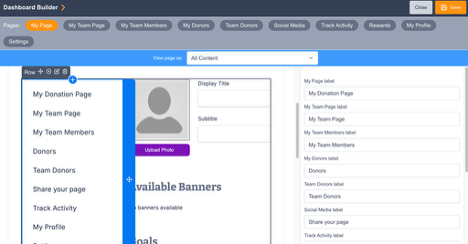
-
We have updated Family Team registration to include the option for teams to be searchable and public. Previously, Family Teams (consisting of a primary participant and dependents) were private by default to protect member privacy. However, this prevented extended family members (like cousins) from finding and joining the same team or the public from donating directly to the team via site search. Therefore, we decided to allow Family Teams to choose if they want to be private or public. Key Features:
-
Privacy Control at Registration: Family Team captains now see a "Make this team searchable" checkbox during the registration process, consistent with regular team flows.
-
Public vs. Private Logic: If left unchecked (which is the default), the team remains private and "invite-only." It will not appear in search results or leaderboards. When checked, the team becomes public, searchable, and joinable by others on the Peer-to-Peer site.
-
Support for Extended Families: This change allows multiple branches of a family to join a single "Family Team" without requiring the captain to manually send private invite links to every individual.
-
Improved Discoverability: Public Family Teams will now appear in site-level search and leaderboards, making it easier for the general public to find and support them.
-
-
We have enhanced the Peer-to-Peer donation management system to allow administrators to edit how a donor's name appears on public-facing Donor Rolls. This provides greater flexibility for honoring specific naming requests or correcting typos without altering the underlying supporter record. Key Features:
-
Custom Display Names: When editing a transaction in the dashboard, administrators can now enter a specific Display Name. If provided, this name will override the default "First Name" on the public donor roll.
-
Maintained Data Integrity: Changing the public display name does not change the name on the underlying supporter's record, keeping your CRM data clean.
-
Anonymous Toggle Priority: The "Anonymous" checkbox remains the primary control. If a donor is marked as anonymous, they will appear as "Anonymous" on the roll even if a custom display name has been entered.
-
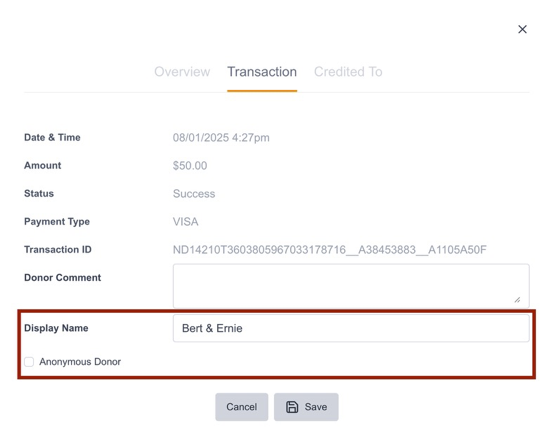
-
We have added back and front-end validation to prevent more than 40 registrations in a single Peer-to-Peer registration transaction.
Peer-to-Peer - Legacy
-
In response to a large volume of fraudulent Peer-to-Peer campaign pages being created on the legacy tools, we have released a new setting giving organizations the ability to require admin-level approval of all DIY fundraising pages before they are able to go live. Once this feature is turned on, the publication of a DIY fundraising page is stalled until an Admin at your organization logs in, determines if the page was created by a legitimate fundraiser, and approves it. Video demonstration.
Bug Fixes
Gateway
-
Stripe:
-
Improved integration to ensure transaction amounts are correctly updated in Payment Intents when donors retry with a different amount.
-
Updated implementation for skipping radar rules when processing subsequent recurring payments.
-
-
Blackbaud:
-
Standardized the format of Campaign Data 13 for BBIP single and recurring card donations to ensure consistency across payment types.
-
Resolved an issue where the Payment Type was showing as 'Unknown' for BBIP card payments.
-
Page Builder
-
If a user adds a profile to the conditional content area of a form and the profile is in a different folder than the already assigned profiles, the existing profiles are removed from the form. This was fixed.
-
Fixed an issue where In Memoriam merge tag fields were not populating in Custom Notifications when using the Stripe gateway.
-
Fixed a markup injection vulnerability in e‑card previews and actual e‑cards by validating and sanitizing the e‑card message field. Only letters, numbers, spaces, and basic punctuation are now allowed.
Marketing Tools
-
If a block in the template has been deleted from the account, then the Marketing Tools template will fail to save. This was fixed so that the deleted block will be used as a local block in the Marketing Tools template without being linked to the library.
-
Users were able to set up a broadcast with a blank segment. This was fixed.
-
Fixed an issue where supporter data tags added into Marketing Tools links were not working
Marketing Automation
-
On February 22nd, user error during a routine code clean-up event caused the data in all marketing automations to become stuck. The mistake was discovered and corrected on February 26th. All active marketing automations are back to working as expected. You are able to identify those supporters who had received at least one message in the journey and were stuck, and at which point in the journey they stopped receiving emails. To do this, download the data from each of your automations, look at the Source column, and locate any supporters for whom the data says “journey:failed”. The column right next to that one (Sequence Received) tells you which emails in the journey a supporter received (there is a separate line of data for each message). You can then determine if you’d like to put them back into a new automation or to simply allow them into your regular email stream.
Segments
-
Adding an “Is Suppressed” filter in the traditional segment builder caused an error that prevented users from saving the segment or running get count. This was fixed.
Export
-
Previously, the API Options > Transaction Types user interface suggested that individual transaction types (e.g., FCS vs. FCR) could be toggled independently for staging to the Bulk API for retrieval. In practice, these are managed at the category level. The updated interface now features category-level toggles to reflect this behavior accurately.
-
Supporter data is now available in ETK, ETA, MSP, and MMR transaction types
Profiles
-
Fixed a discrepancy in the Export Supporter Data query builder where supporter counts differed between count and export due to supporters in Email Marketing Automations.
Opt-in
-
Some questions and opt-ins could not be deleted, even when they were not used on any live pages or shared components. This was fixed.
Peer-to-Peer
-
Previously, when a single supporter registered multiple fundraisers in the same transaction, the registering supporter would show "Paid" while the other registrants would show "Unpaid", though their registration was paid for by someone else. This has been fixed so that upon completing registration payment, all included registrants will show a "Paid" status.
-
Previously, there was no direct registration link available in the platform for Participation Types. This has been fixed to show a direct registration link under "Additional Participation Options".
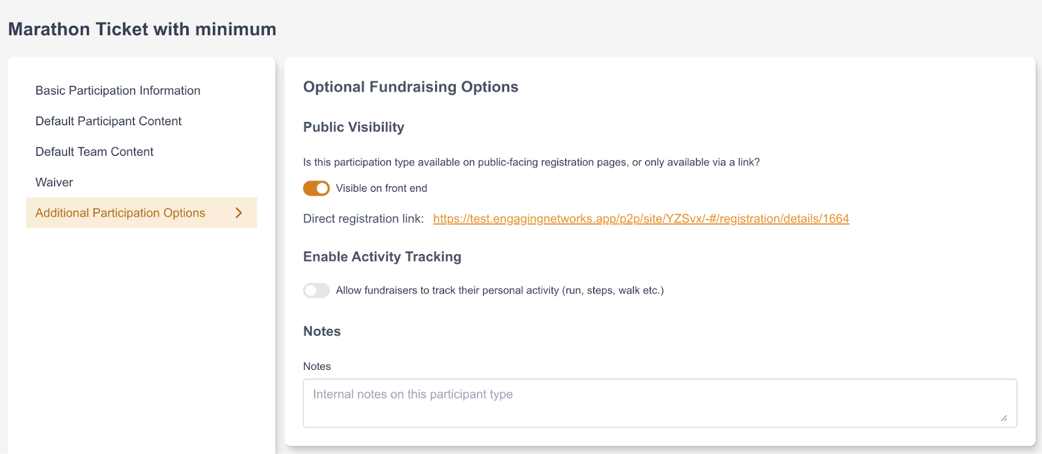
-
Previously, if you used a 100% discount code for registration on a Peer-to-Peer site, you would still be redirected to the checkout page and encounter an error when you try to submit your registration. This has been fixed so that supporters who enter a 100% off discount code and don't add an additional self donation will not be redirected to the checkout page to finish their registration.
-
Previously, payments in "pending" status did not appear in Peer-to-Peer sites under Registration Payments or Donations. This has been fixed. Pending payments will not count towards totals.
-
There was previously an issue where the minimum commitment page did not properly update when a digital wallet was used to charge the minimum commitment. This has been fixed.
-
Previously, refunding an offline gift made to a Peer-to-Peer site did not reflect properly in the site under Donation Management, and also did not change site and individual totals to reflect this refund. This has been fixed. As a result, “Refund donation” will now be allowed for all cash and check donations in the single donations gadget (whether made via a Peer-to-Peer site or page-builder) and refunding these transactions will properly create an RFD (or PRFD in the case of Peer-to-Peer offline transactions) row.
-
Previously, the setting "Prevent the Page Builder editor from visually rendering this template" was not respected in Peer-to-Peer site page building. This has been fixed so that the setting is respected in Peer-to-Peer site page building.
February 2026 - 6.0.0
This release was deployed on Thursday, February 5th, 2026 at 3pm ET.
Technical Upgrade
We are performing a technical upgrade to our platform as part of this release. This upgrade modernizes our infrastructure, improves security, and ensures the long-term reliability of your services. No action is required on your part, and you should not notice any changes to your day-to-day operations. If you have any questions or notice anything unusual, please contact our support team.
The other items (below) included in this release will also be rolled out with the technical upgrade. All release items will be available after the upgrade is completed.
Coming Soon
Development work continues on three major initiatives – Smart Pages, event waitlist, and SMS inboxing. These exciting additions are planned for release in early 2026. While details about these new features are not included in this release, we’re busy laying important groundwork — building out the backend framework and foundational components that will support their development. Watch this session from ENCC D.C. to get a look at Smart Pages!
Notable items in this release
Segments now available in Marketing Automations
We’ve expanded the Marketing Automations feature to support Segments as automation triggers, giving you a more consistent way to define and target audiences across all Marketing Tools — broadcasts and automations alike.
You can now select any existing segment as the target for an automation. When a segment is used as a trigger, newly qualifying supporters are seamlessly enrolled in the automation after they join the segment.
This release marks the first phase of our plans for deeper integration of Segments within Marketing Automations. In upcoming releases, you’ll see expanded support for Segments, including their use in inclusion and exclusion criteria for even more advanced audience targeting.
Plaid is replaced with Stripe Financial Connections: After listening to feedback from clients, we are deprecating Plaid in favor of Stripe's own bank verification system, known as Financial Connections (FC), for ACH transactions. After this release, all Stripe ACH transactions will be processed directly through Stripe, and not Plaid. There is no additional setup needed, and the existing “ach” payment type will be used. Note that in our last release, we added “ach_stripe” as a temporary payment type, enabling you to test the new bank verification flow before we made this switch. This temporary payment type will be removed with this release.
Improvements
Import
-
We are now limiting import jobs to a maximum of 500 jobs at a time.
Gateway
-
Stripe: Further improved fraud detection while using the Stripe gateway.
Symbolic Pages
-
Symbolic giving donation pages now support digital wallets.
VGS
-
Updated library to latest version to address autofill issues with Safari 26.
ROI
-
Updated authentication method to be based on client ID and secret (OAuth 2.0). Existing clients' credentials have been updated.
Peer-to-Peer
-
Added ability to duplicate an existing automation email for coaching, milestone, and registration emails.
Bug Fixes
Segments
-
When selecting Symbolic Gift Product as a segment criterion in either the broadcast audience segment creation or segment builder, an error message appeared in the UI: “There was a problem with that action — can’t access property ‘content’, t\[0\] is undefined.” This has been fixed.
-
There was an issue with the Advocacy Target Pages data category in Segments, preventing the participating filter from working as expected. This has been resolved.
Fundraising
-
In the Transaction Details View of the Gift View Report, the "Next Recurring Payment Date" was shown incorrectly. This was fixed.
Peer-to-Peer
-
When registering a main participant with two dependents using a paid participant type and applying a discount code, the checkout page and the registration payments record were showing different discount calculations. This was fixed.
-
Previously, if a supporter paid for their Peer-to-Peer registration on a different day than their original registration (PFRP) transaction, their PPAY (registration payment) transaction would be backdated to the date they originally started their registration. This caused these delayed PPAY transactions not to come out of the Bulk Export API. This has been fixed so PPAY transactions correctly reflect the date the payment was made.
-
Previously, fundraisers with "BLOCKED" status counted against the registration limit for their participation type. This has been fixed so that blocked fundraisers' registration slot returns to the pool of registrations available.
-
Cloning P2P site did not properly copy over event fields. This was fixed.
-
When viewing a supporter in Lookup Supporter, the Peer-to-Peer Summary gadget incorrectly shows no activity even though the supporter has confirmed peer-to-peer registration data. This was fixed.